
Spotify rolls out Smart Filters to let you sort your library for the perfect moment
Spotify is giving you a more personalised listening experience by letting you filter your library by activity, mood, or genre.
Spotify’s new Smart Filters
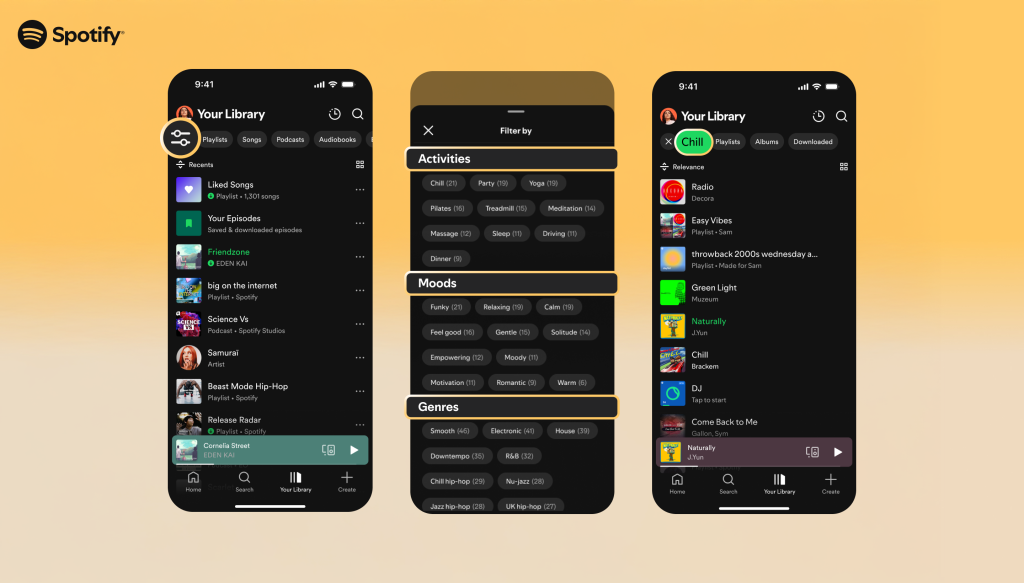
Spotify is stepping up its personalisation game once again. The platform is launching Smart Filters, a new tool that allows users to filter their saved content by activity, mood, or genre. Smart Filters isn’t just exclusive to your saved music either, letting you filter playlists, audiobooks, and podcasts too. So whether you’re getting ready for a workout, looking for something chill after work, or in the mood for a specific vibe, you’ll be able to tailor your listing for any occasion.
How to use Smart Filters
Filtering your content is simple. Just head to Your Library on Spotify and tap the filter button in the top left corner. From there, the Smart Filters menu will appear, showing you options that are built around your saved content, and are sorted by activity, mood, or genre. Pick whatever matches your vibe, and Your Library will instantly refresh to serve up a fitting selection.
Where and when are Smart Filters rolling out?
Spotify’s Smart Filters are rolling out now, and will be available for users in select regions in the coming weeks. It’s coming to Premium subscribers on mobile and tablet in the UK, US, Canada, Ireland, Australia, New Zealand, and South Africa.
Another tool for greater personalisation
Smart Filters are the latest in a string of updates aimed at giving users more control over what they’re listening to. Just this year, Spotify has:
Together, these updates highlight Spotify’s focus on personalising your listening experience, putting you in control of what you’re listening to.