
How to pass RouteNote moderation first time
Learn how to pass RouteNote moderation first time with our guide to audio, artwork and metadata requirements, helping you get your music onto streaming services faster.
Uploading your music with RouteNote is quick and straightforward, but every release is reviewed before it can be sent to stores.
Following a few simple formatting and rights guidelines can help your release pass moderation the first time, avoiding unnecessary delays and getting your music onto streaming services sooner.
This guide covers the most common reasons releases are held during moderation, along with practical tips to help you upload everything correctly from the start.
Why moderation matters
Before your music is delivered to streaming services and download stores, every release submitted through RouteNote is reviewed by our moderation team. This helps ensure your release meets the requirements of platforms like Spotify, Apple Music, Amazon Music and Deezer, while also confirming that your metadata, artwork and audio are accurate and that you have the necessary rights to distribute your music.
Taking a few extra minutes to prepare your release can help avoid common mistakes that may delay approval. Following the guidance below will give your release the best chance of passing moderation first time, so it can reach listeners as quickly as possible.
Take a look at our Style Guide for help with getting things right first time.
Audio
Your music is the most important part of your release, so it’s essential that your audio meets both RouteNote’s requirements and the standards expected by digital streaming services.
Use high-quality audio
Upload your tracks in a supported lossless format, such as WAV, to ensure the best possible listening experience across streaming platforms. Low-quality, distorted or corrupted audio may be rejected during moderation.
Only distribute music you have the rights to
You can only upload music that you own or have permission to distribute. This includes every element of the recording, from the composition to any third-party audio you’ve used.
If your release contains any of the following, you must have the appropriate rights or licences:
- Samples
- Remixes
- Beats or backing tracks created by someone else
- Third-party recordings or sound effects
Our moderation team may ask you to provide proof that you have the necessary rights before your release can be approved.
Releasing a cover song?
Cover songs are accepted on many streaming services, but licensing requirements vary between territories and platforms. Before uploading a cover, make sure you understand any mechanical licensing requirements that apply to your release. If you’re asked to provide licensing documentation during moderation, you’ll need to supply it before your release can be delivered.
If you’re unsure whether your release needs additional permissions, our Support Hub has detailed guidance on cover song distribution and licensing.
AI-generated music
We accept both AI-assisted and AI-generated music, provided you have the rights to commercially distribute the content and it complies with our moderation guidelines.
If you create music using AI tools such as Suno, make sure you have the appropriate commercial licence for your track. For example, tracks created with Suno must be generated under a paid subscription that grants commercial rights.
We do not accept content that impersonates or attempts to mislead listeners by replicating the voice, identity or likeness of another artist without authorisation.
Please note that AI-generated releases are not eligible for content recognition services, including YouTube Content ID and Facebook/Instagram Fingerprinting.
As AI technology and platform policies continue to evolve, our moderation requirements may also change. For the latest guidance, always refer to the Support Hub before uploading AI-generated content.
Artwork
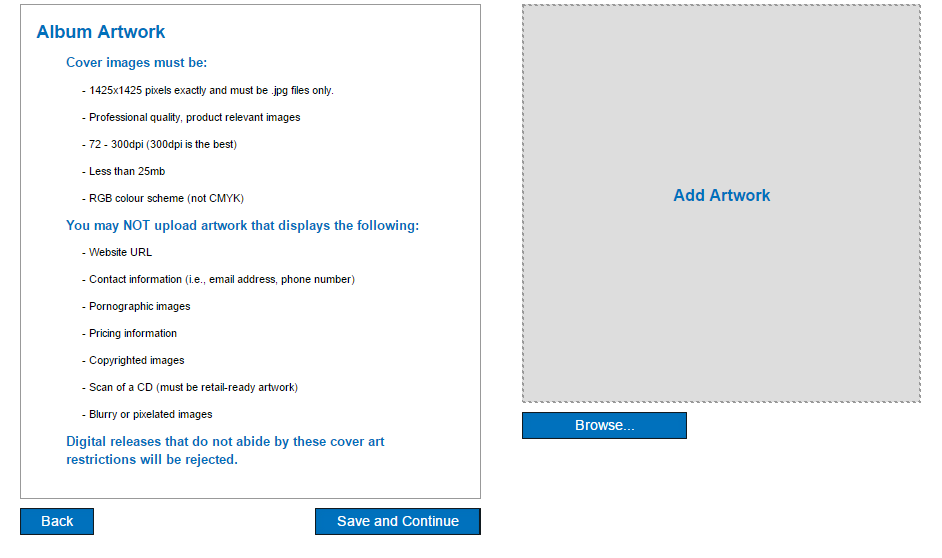
Your artwork is often the first thing listeners see, so it needs to meet both RouteNote’s requirements and the standards set by digital music services. Clear, high-quality artwork also helps present your release professionally across every platform.
We ask that you don’t include the following:
- Contact information (including social media and websites)
- Pricing information
- UPC bar codes
- Misleading text
Artwork must be a square image at least 1425 × 1425 pixels and should be clear, high quality and free from blurring or pixelation.. Other than that as long as the artwork isn’t stretched, blurred or pixelated you’re one step closer to perfecting your release!
Metadata formatting
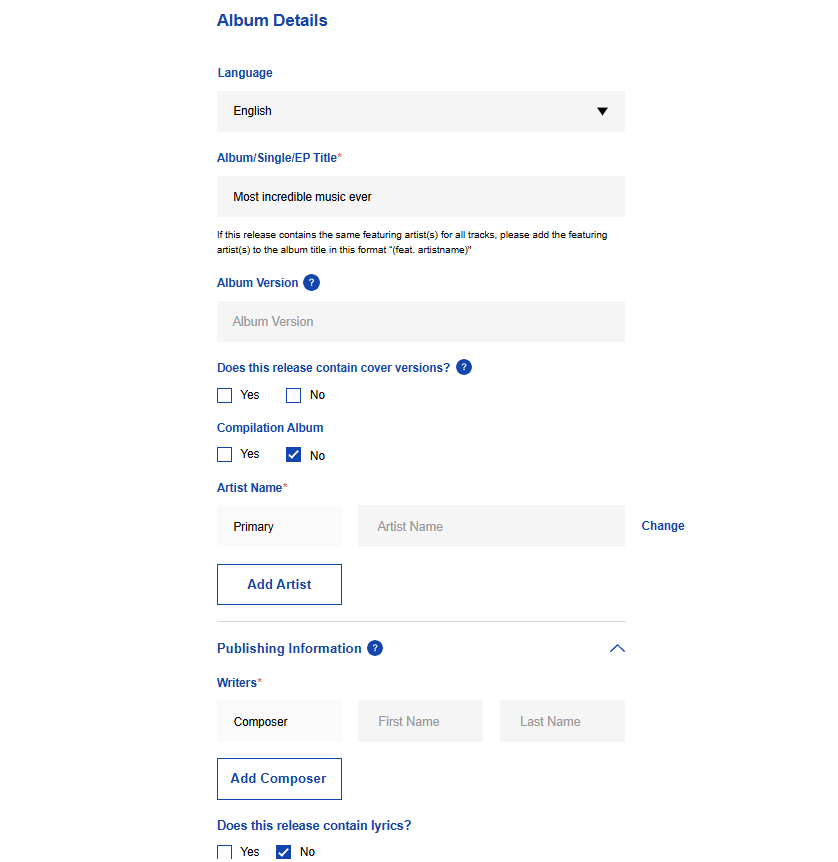
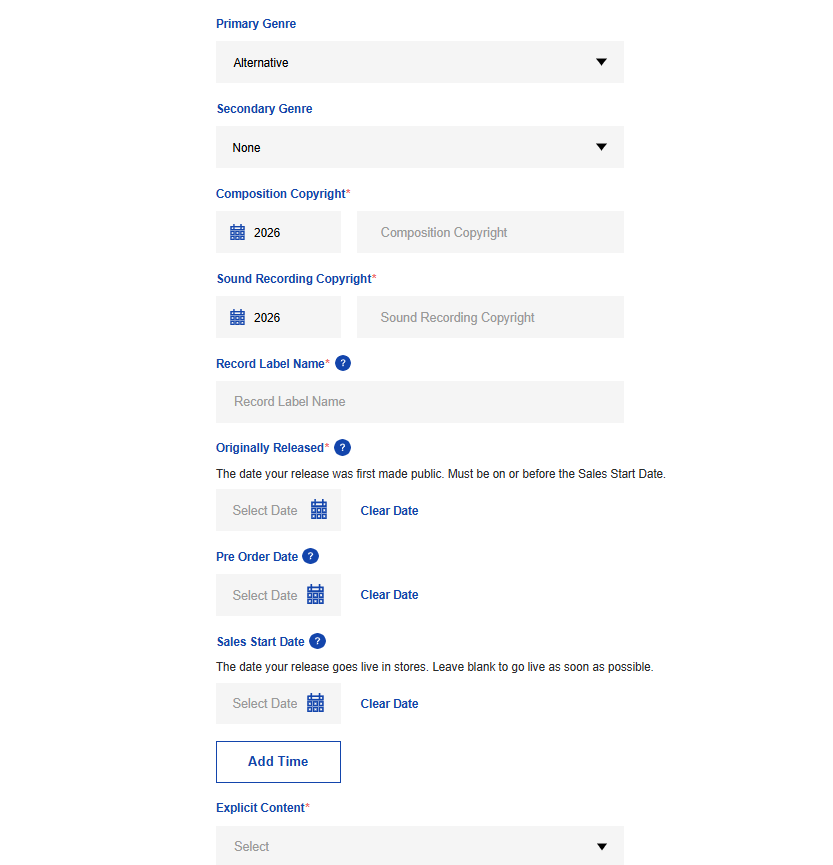
Metadata includes everything from your artist name and release title to track names and contributor credits. Accurate metadata helps streaming services display your music correctly and reduces the chance of your release being delayed during moderation.
General
Follow these general guidelines across your release:
- Use correct capitalisation for English-language releases. Avoid using ALL CAPS or random capital letters. Connective words such as and, of and the should only be capitalised when they begin a title. Releases in other languages should follow the conventions of that language.
- Don’t include unnecessary symbols, underscores, dates or special characters unless they’re genuinely part of the title.
- Every release must include a valid label name. Placeholder text such as “None”, “N/A”, URLs or “RouteNote” cannot be used.
- Metadata should normally be entered in a single language. If you require multilingual metadata for supported stores, please contact our support team after your release has been approved.
Artist credits
Correctly crediting everyone involved in your release is essential.
- Add every contributing artist using the appropriate artist role rather than combining multiple names into one field.
- Featured and “with” artists should also appear in the track title using the correct format:
- Track Title (feat. Artist Name)
- Track Title (with Artist Name)
- If an artist appears on every track, they should be credited at both release and track level.
- Producers should be credited in the contributor fields rather than included in release or track titles.
- Artist names must be original and must not copy or imitate an existing artist.
- Don’t add aliases or nicknames in brackets after an artist’s name.
- If your release contains four or more primary artists, the release artist should be listed as Various Artists. Releases with fewer than four primary artists should not use this credit.
- For cover songs, credit the original songwriter or composer in the appropriate copyright fields rather than the release title or artist name.
Release titles
Keep your release title clear and consistent.
- Single releases should use the same title as the track.
- Don’t include the primary artist name in the release title.
- Release titles are limited to 15 words.
- Avoid unnecessary version information unless it’s genuinely part of the release.
Track metadata
Track titles should accurately reflect the music you’re releasing.
- Number tracks using the track listing rather than including numbers in the title itself.
- Don’t use duplicate track titles within the same release.
- Don’t include the primary artist name in the track title.
- Include featured or “with” artists using the correct formatting.
- Avoid misleading titles that could be confused with another artist’s well-known recording.
- Terms such as “Original Mix” or “Single Version” should only be used where appropriate and in line with store guidelines.
- Track titles are limited to 12 words.
Classical releases
Classical music follows different metadata conventions to most other releases, and correctly formatting your titles and composer credits is essential for passing moderation.
Before submitting a classical release, make sure your release title, track titles and composer credits follow the required formatting expected by digital music services. If you’re unsure, we recommend checking our full Style Guide before uploading.
For example, a track title should look something like:
Symphony No. 2 in D Major, Op. 73: Feierlich
Taking a few moments to check your metadata before submitting can help avoid unnecessary delays during moderation.
Still have questions?
If you can’t find the answer you’re looking for in this guide, our Support Hub contains detailed articles covering everything from artwork and metadata to cover songs, AI-generated music and release licensing. You can also ask Luna, RouteNote’s AI support assistant, for instant answers to common questions about uploading and distributing your music.
If you still need help with a release that’s currently in moderation, you can contact our moderation team directly at moderation@routenote.com.
Taking a few extra minutes to check your release before submitting can save valuable time later. Once everything’s ready, upload your music to RouteNote and we’ll take care of the rest.