
How to add custom thumbnails to YouTube Shorts
YouTube is finally letting creators customise their Shorts thumbnails. Here’s what the update means, who can use it, and why it’s worth paying attention.
Click below jump to the following:
- YouTube now supports custom thumbnails for Shorts
- How to change your YouTube Shorts thumbnail
- YouTube is improving thumbnails across the platform
- Why custom thumbnails matter
- Make the most of Shorts with your next release
For years, creators have been asking for one simple feature: the ability to choose a proper thumbnail for YouTube Shorts. Creators were largely stuck with selecting a frame from within the video, making it difficult to create eye-catching, consistent branding across their channel. But now, that’s finally changing.
YouTube has announced that creators in the YouTube Partner Program (YPP) can now upload custom thumbnails for Shorts, giving creators much more control over how their short-form videos appear across YouTube. According to YouTube, it’s one of the platform’s most requested features, with broader availability planned over time.
For independent artists, labels and music creators, it’s another welcome update that makes Shorts a stronger platform for music discovery.
YouTube now supports custom thumbnails for Shorts
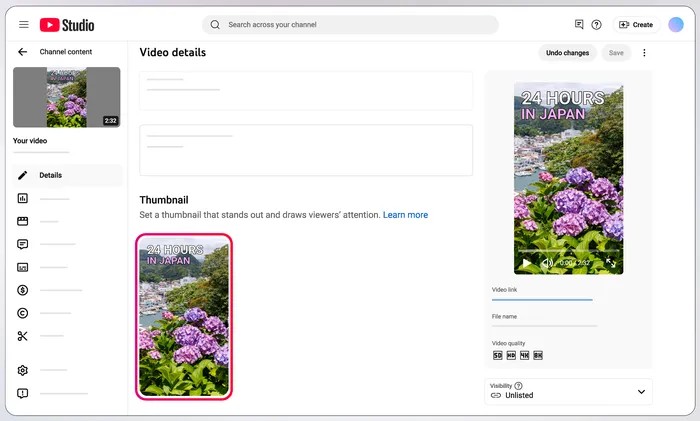
As part of a wider update to YouTube Studio, eligible creators can now upload a custom image to use as the thumbnail for their Shorts.
Previously, creators could only select a frame from their video, usually from within the YouTube mobile app. While some creators tried to work around this by designing “thumbnail frames” into the opening seconds of their Shorts, the results weren’t always ideal.
Now, YouTube Partner Program creators can upload a dedicated thumbnail instead, allowing them to create cleaner and more consistent branding across Shorts. According to YouTube, the goal is to make thumbnails easier to create while helping viewers discover content more easily.
How to change your YouTube Shorts thumbnail
If you have access to the feature, changing your Shorts thumbnail is straightforward.
Simply:
- Open YouTube Studio
- Select Content
- Choose the Short you’d like to edit
- Select Edit thumbnail (on the app)
- Upload a custom image or choose one of YouTube’s auto-generated options
- Save your changes
YouTube notes that custom thumbnails require your account to be verified and must comply with the platform’s Community Guidelines.
At launch, uploaded custom thumbnails are only available to creators in the YouTube Partner Program, with YouTube saying support will expand to more creators in the future.
YouTube is improving thumbnails across the platform
The Shorts update wasn’t the only thumbnail announcement.
YouTube also revealed that desktop users can now choose from three suggested thumbnail frames for Shorts, bringing the experience more in line with long-form videos. Mobile users can still manually choose any frame from within the Short.
On top of that, YouTube is expanding its AI-powered Ask Studio tools, allowing creators to generate thumbnail ideas for Shorts using prompts just like they can with long-form videos. Creators can even refine colours, layouts, and styles to tailor the thumbnails to your video’s specific themes.
Taken together, the updates show YouTube continuing to invest in helping creators improve discoverability while reducing the time spent on repetitive creative tasks.
Why custom thumbnails matter
For artists promoting music, first impressions matter. A Short announcing a new single, teasing a music video, showing behind-the-scenes footage or jumping on a trend now has a much better chance of fitting neatly into your wider visual identity.
Instead of relying on an awkward freeze-frame, you can use artwork, bold text, artist branding or imagery that instantly tells viewers what they’re about to watch.
That consistency becomes even more valuable as more fans discover artists through short-form content before ever hearing a full release.
Custom thumbnails also make your channel feel more professional when someone lands on your profile, especially if you’re using Shorts as part of a broader release campaign.
While custom thumbnails may seem like a small update, they remove one of the biggest frustrations creators have had since Shorts launched.
Make the most of Shorts with your next release
If you’re planning your next release, Shorts can be a powerful way to build momentum before and after launch. Share snippets of upcoming tracks, behind-the-scenes studio sessions, live performances, lyric previews or fan reactions, then pair them with strong thumbnails that encourage viewers to click.
RouteNote helps you distribute your music to YouTube Shorts and many more platforms worldwide, with Shorts helping drive listeners towards your latest release while growing your audience across different platforms.
The easier it is for people to discover your content, the more opportunities you have to turn casual viewers into long-term fans.
Distribute your music to Shorts for free with RouteNote and start growing your music today!