
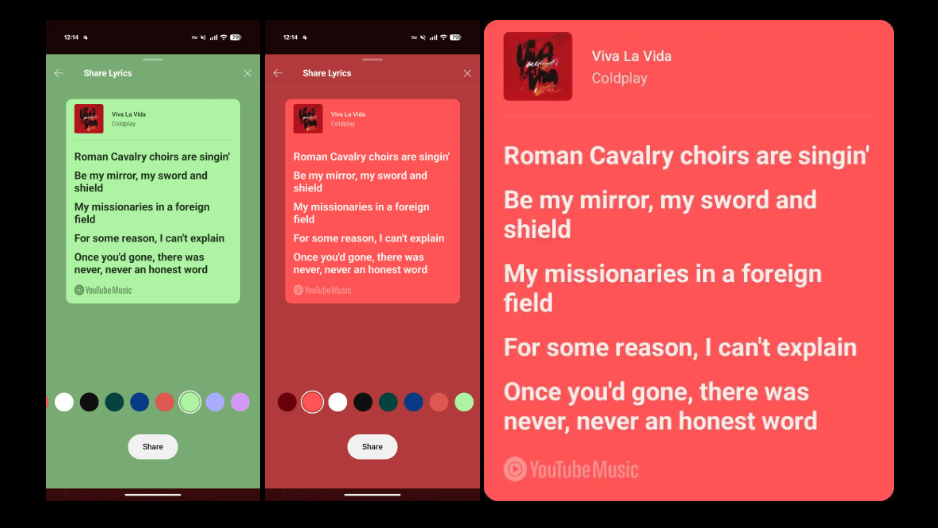
YouTube Music now lets you share lyrics
Image credits: 9to5Google
YouTube Music rolls out a new tool which lets users share their favourite lyrics as stylish graphics.
YouTube Music has officially launched its new lyric-sharing feature to users on both Android and iOS.
News broke in April that YouTube Music was testing the feature on Android, but is now live more widely. It allows users to pick and share up to five lines of lyrics from a track. Subsequently, creating a visual graphic that includes the song title, artist, album artwork, and YouTube Music branding.
Am I the only one with this?
byu/reyrey241 inYoutubeMusic
How does it work?
Sharing lyrics on YouTube Music is simple and offers almost no difference to what was tested in April:
- Play a track and head to the “Lyrics” tab on the Now Playing screen.
- Tap the new “Share” button (found at the bottom of the screen).
- Choose your lyrics within this “Select Lyrics” screen (up to 5 lines).
- Press “Next” and pick a background colour – there are ten to choose from, with the first matching the background of the Now Playing screen.
- “Save image” to your device or immediately “Share with other apps”.
The visual format makes it easy to post to socials, send to friends, or save for later- akin to a similar function available on Spotify and Apple Music.
How to get it?
The feature is available on version 8.24 of the YouTube Music app for both free and Premium users. 9to5Google says that if it’s not showing up, try force-stopping and reopening the app.
This update brings YouTube music one step closer to the social-friendly tools already offered by its competitors, and makes sharing lyrics easier than ever.
Distribute your music to YouTube Music and other streaming platforms for free with RouteNote!