

Spotify launches Page Match and enters into physical bookselling
Spotify has made it easier to keep the story flowing with its new feature that enables easy switching between audiobooks and physical books.
Was one of your New Year’s resolutions to read more? Spotify evidently wants to help people achieve their goals of becoming more bookish, as it launches and expands its foray into the literary world. After initial testing, the platform has launched Page Match, enabling users to continue listening to the audiobook version of whatever they’re reading by scanning text with their phone camera.
Page Match is a handy new feature that Spotify has designed to make the jump between physical reading and audiobooks as seamless as possible. No more scrubbing frantically through your audiobook to find your place as you jump in the car and hurry off to work. Interestingly, the feature works in reverse too, and lets users locate the physical page that lines up with where they left things with their audiobook.
As The Verge notes, Spotify’s Page Match works with physical books, as well as ebooks on any kind of e-reader. This positions it as a strong competitor for Amazon’s own Whispersync for Voice, which locks users in to Audible and Kindles only.
How to use Page Match
Page Match is rolling out now, and will be available for most English-language books by the end of February. This applies to listeners on both iOS and Android, with Premium users and Audiobook+ members able to use the feature as part of their monthly audiobook listening hours. Free users can access the feature with individual audiobooks that they’ve purchased through Spotify.
To use the feature, users must first ensure that their Spotify app is up to date.
If you want to switch from reading a physical book to listening to an audiobook (which The Verge says is the smoothest direction the feature runs in), here’s how you do it:
- Find the audiobook (for supported titles – of which there are over 500,000) in the Spotify mobile app and tap the Page Match button
- Then, press Scan to listen
- Allow camera access and scan the page of the book you’re reading
- Spotify will find the corresponding point in the audiobook and enable you to Play from here or Save for later
- If unsuccessful the first time, the app will prompt you to try again
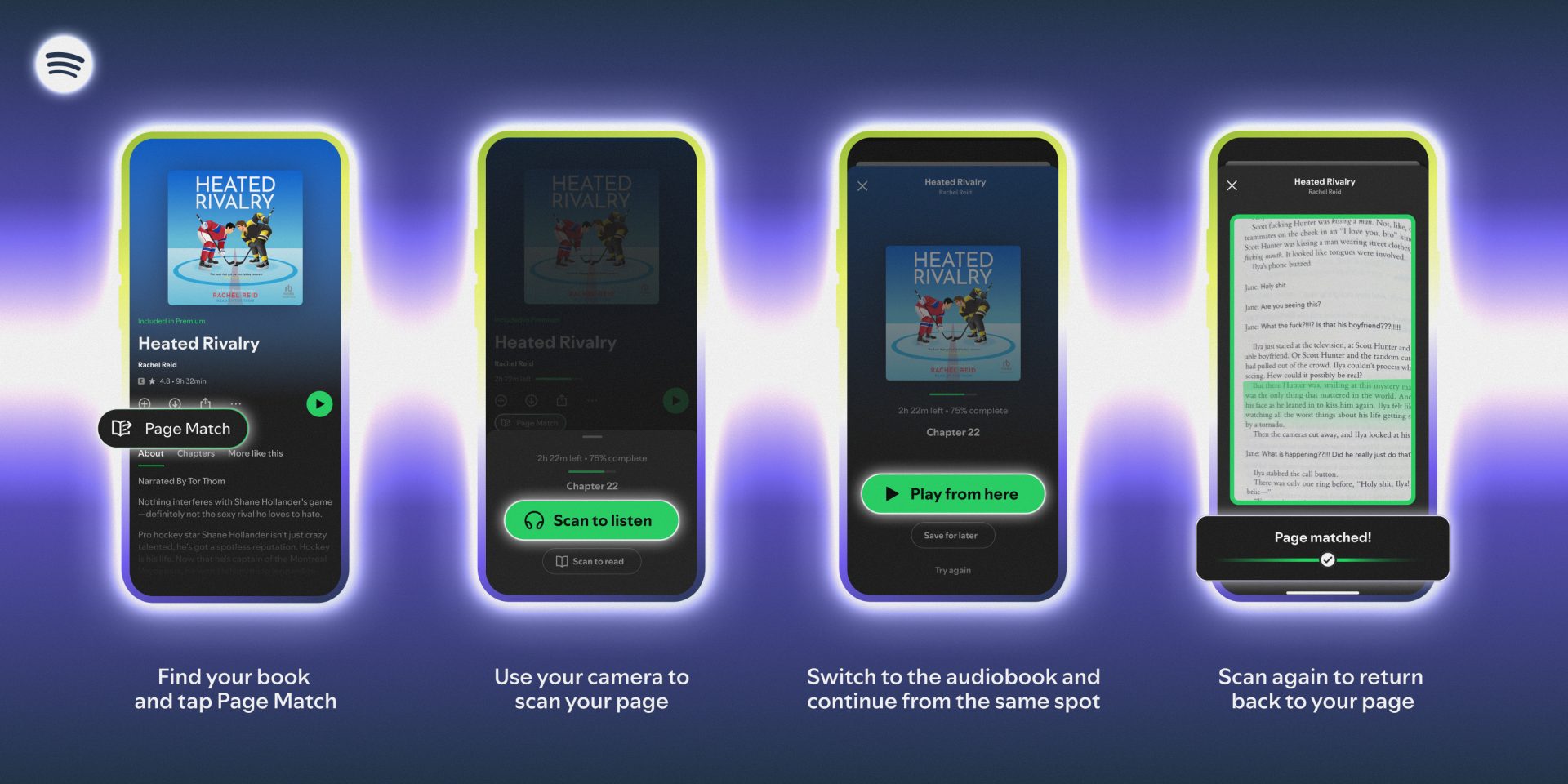
Once you’re ready to go back to analogue, you can also jump from audiobook to physical, or ebook if that’s youre preference. The Verge highlights that, at first, this direction of the feature can feel a little sluggish and tricky to interpret. Here’s the process for this:
- Open the audiobook in the Spotify mobile app and tap the Page Match button
- Tap Scan to read
- Scan any page in your book so that Spotify can get its bearings
- Spotify will then guide you towards the correct place in the book where you stopped listening, directing you to go forwards or backwards to find the exact passage that you should continue reading from
Because books come in different editions and sizes, page numbers alone don’t help with locating the correct point in your book. Instead, a progress bar is displayed on the Spotify app, letting you know how far off you are from flicking over to the page you need.
Spotify expands into physical books
To accompany Page Match, Spotify is making it a total breeze to buy the physical copy of the audiobook you are listening to. By partnering with Bookshop.org, an online book market that supports independent booksellers. Bookshop takes care of all the pricing, inventory, and the shipping as well. Each book purchase made through Spotify will directly benefit independent bookshops and local book communities, as TechCrunch notes, while Spotify will earn affiliate fees on purchases.
The ability for users to buy physical books through Spotify will roll out this Spring, and can be done via the button Add to your bookshelf at home in the app. This button will then transport users to Bookshop.org.
More audiobook updates coming
Audiobooks have been a firm focus for Spotify, with the platform gradually adding more and more languages, as well as expanding its recap feature. Audiobook Recaps, which provides helpful recaps of the last section a user was listening to, was previously only available for iOS. This spring, the feature will become available for Android user as well, encouraging more people into the Spotify audiobook space.
It’s only been a couple years since Spotify introduced audiobooks, and in that time it has positioned itself as a serious competitor of Amazon, and now major physical booksellers like Barnes & Noble. With aggressive expansion of its podcast offerings, as well as now audiobooks, Spotify has come a long way from just music streaming, as it seeks to onboard users to meet nearly all their entertainment needs.