

New iOS 26 feature stops AirPods from auto-switching to other devices
A new setting will fix that awkward moment when your AirPods start blasting sound through your car or speaker.
A handy new feature coming with iOS 26 is set to solve a long-standing gripe for AirPods and Bluetooth headphones users.
While Apple’s upcoming iOS 26 announcement focused on improving mic quality and introducing new camera remote features for AirPods, a more low-key feature is going under the radar: a new ‘Keep Audio with Headphones’ setting.
A fix for unwanted audio switching
If you use AirPods or Bluetooth headphones daily, you’ll understand the struggle. One moment you’re listening to your AirPods privately. Next, your music, podcast, video, or voice note is blasting through your car stereo, speaker, or another nearby device.
Auto-switching can be helpful, such as when you hop into your car and want your audio to follow. However, this isn’t always the case and often catches people off guard.
Apple’s description of the feature reads:
“When using AirPods or other wireless headphones, keep audio with headphones when other devices like speakers or cars connect to iPhone”.
The ‘Keep Audio with Headphones’ feature
With iOS 26, Apple is giving users the choice. The new ‘Keep Audio with Headphones’ toggle allows you to prevent your audio from auto-switching to other devices.
It’s off by default, but is simple to switch on. Here’s how:
- Open Settings on an iPhone running iOS 26
- Tap General
- Choose AirPlay & Continuity
- Turn on Keep Audio with Headphones
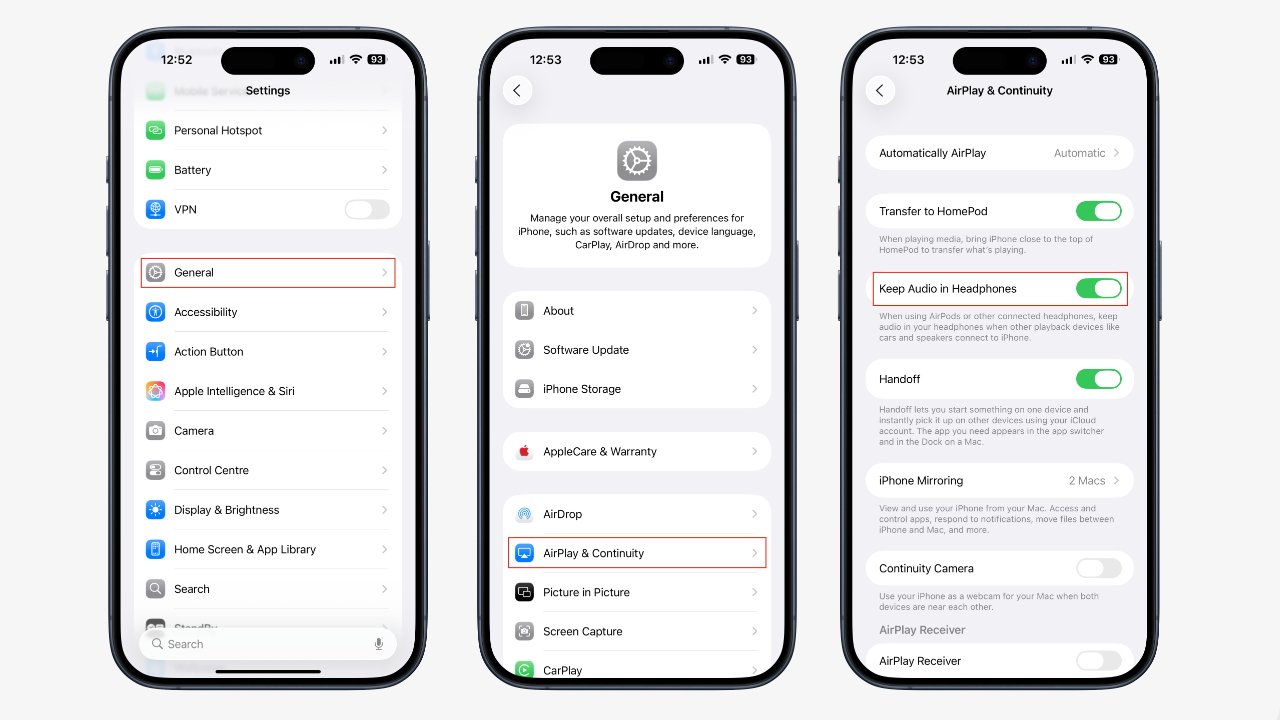
Once enabled, your audio won’t jump to other connected devices unless you tell it to.
When is it coming?
iOS 26 is currently in public beta testing and is expected to officially launch this fall. The update might not be the flashiest part of iOS 26, but it will be useful for AirPods users. It serves as another smaller feature for AirPods users, alongside the upcoming feature that will automatically pause AirPods audio when you fall asleep.