
YouTube now lets creators clone themselves for Shorts
YouTube is rolling out an AI avatar tool that aims to look and sound like real creators. Here’s all you need to know.
YouTube rolls out AI avatar tool
YouTube is stepping further into generative AI. After teasing the feature at the beginning of this year, the platform is introducing a new feature for Shorts that lets creators build AI avatars of themselves. They’re designed to look and sound exactly like the real thing too, so it’s not just a filter or poorly-made cartoon lookalike.
Once created, these avatars can be dropped into existing Shorts content or be used to generate entirely new Shorts videos. For creators, that could seriously cut down on filming time.
It comes at a time where YouTube seems to be both leaning into using AI to enhance the creator experience, while somewhat clamping down on low-quality, mass-produced AI content.
So, how does it work?
The process is pretty straightforward. Creators record a short “live selfie” video and read a few voice prompts. From that, YouTube generates a photorealistic avatar that mimics both appearance and voice.
From there, you can either remix your avatar into existing Shorts, or generate entirely new videos from text prompts. You are able to generate short clips up to 8 seconds long, but these can be stitched together to create something longer.
How to create your YouTube AI avatar
Users can create their AI avatar from inside the YouTube mobile app or on the YouTube Create app, but you must be 18 years or older and the owner of an existing YouTube channel.
Here’s how you do it from the YouTube app:
- Open the YouTube app.
- Tap the “+” (Create) button.
- Tap the Gemini icon to enter the AI playground.
- Select “Create video” > Make a video with my avatar
- Follow the prompts to record your face and voice.
- Preview your avatar and either confirm or retake.
To create your avatar on the YouTube Create app, go to the “My avatar” homepage banner and proceed to the prompts. The setup only needs to happen once, but you can retake or update your avatar whenever your look changes.
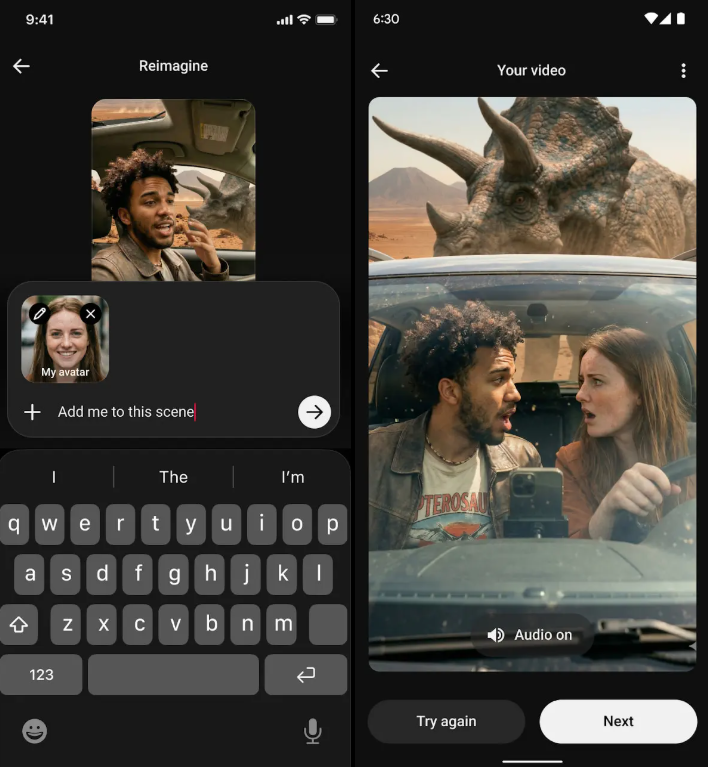
Once you’re set up, you can start generating by typing a prompt for the type of video you want to create. Or, you can add your avatar directly into eligible existing Shorts via the Remix > Reimagine > “Add me to this scene”. Within the YouTube Create app, tap “Generate video” and select your avatar to use it as a reference in your prompt.
The important stuff
Of course, when it comes to helping creators create AI-generated content there are bound to be questions. YouTube is positioning the tool as a “safe and secure” way to use AI versions of yourself, as opposed to using a third-party tool to do the same thing anyway.
With that, YouTube has guardrails in place to protect creators:
- Only you can use your avatar to create original videos.
- You can delete or retake your avatar at any time.
- Avatars are automatically deleted after three years of inactivity.
- You can limit or disable remixing on Shorts that include your avatar.
That last point is important. If you opt out of remixing, any existing remixes using your content are removed too. That gives creators a level of control over their original content, preventing others from using it for their own AI content.
YouTube has also remained consistent in its approach to transparency around AI-generated content, and here is no different. Every video generated with an AI avatar will include visible watermarks and digital labels, like SynthID, which make it clear that content is AI-generated.
The bigger picture
Last year, YouTube somewhat tightened its rules when it came to low-quality, mass-produced AI content. Yet, at the same time, it’s been rolling out tools that make AI content easier than ever to produce on YouTube.
For creators, it offers the ability to infinitely generate content regardless of time, location, or equipment. Plus, it also gives creators official tools which could reduce reliance on third-party deepfake services.
But with that, it makes it easy to quickly produce more AI-generated content that is already flooding social platforms everywhere.
Final thoughts
YouTube’s AI avatar tool could be an interesting feature for creators to utilize and speed-up their creative process. Yet, at the same time it feeds into the bigger shift happening across all creative industries, and the concerns that come with it. Yes, content is faster to make, easier to scale, but it also makes it harder to differentiate between real creators.
Still, there’s no doubt that AI-generation is already part of the content ecosystem. With this new feature, YouTube is just giving its creators a safer way to use something that they could already use outside of its platform anyway. Plus, whether creators will actually use it in their masses is another question entirely.