

Spotify’s new Smart Reorder makes song transitions even smoother
Nail your song transitions like a pro DJ with Spotify’s new Smart Reorder feature.
Spotify is building further on its Mix feature with a new upgrade designed to make playlist transitions feel even more seamless. The latest addition, Smart Reorder, gives Premium users a quick way to rearrange mixed playlists so tracks flow better from one to the next.
Last year, Spotify introduced Mix, bringing customisable transitions to personal playlists. Users could apply crossfades, beatmatching and EQ fades in real time. Since that launch, listeners have embraced the feature in a big way. According to Spotify, Premium users around the world have streamed more than 220 million hours of their mixed playlists.
What is Smart Reorder?
Smart Reorder is a new addition within the Mix feature. It automatically rearranges the order of songs in a mixed playlist based on BPM (beats per minute) and musical key.
Instead of manually shifting tracks around to find the best flow, users can call on Spotify to do the heavy lifting. The feature analyses tempo and key signature for compatability between tracks, which allows it to create a more natural progression between songs, ensuring playlists “flow even more seamlessly”.
How to use Smart Reorder
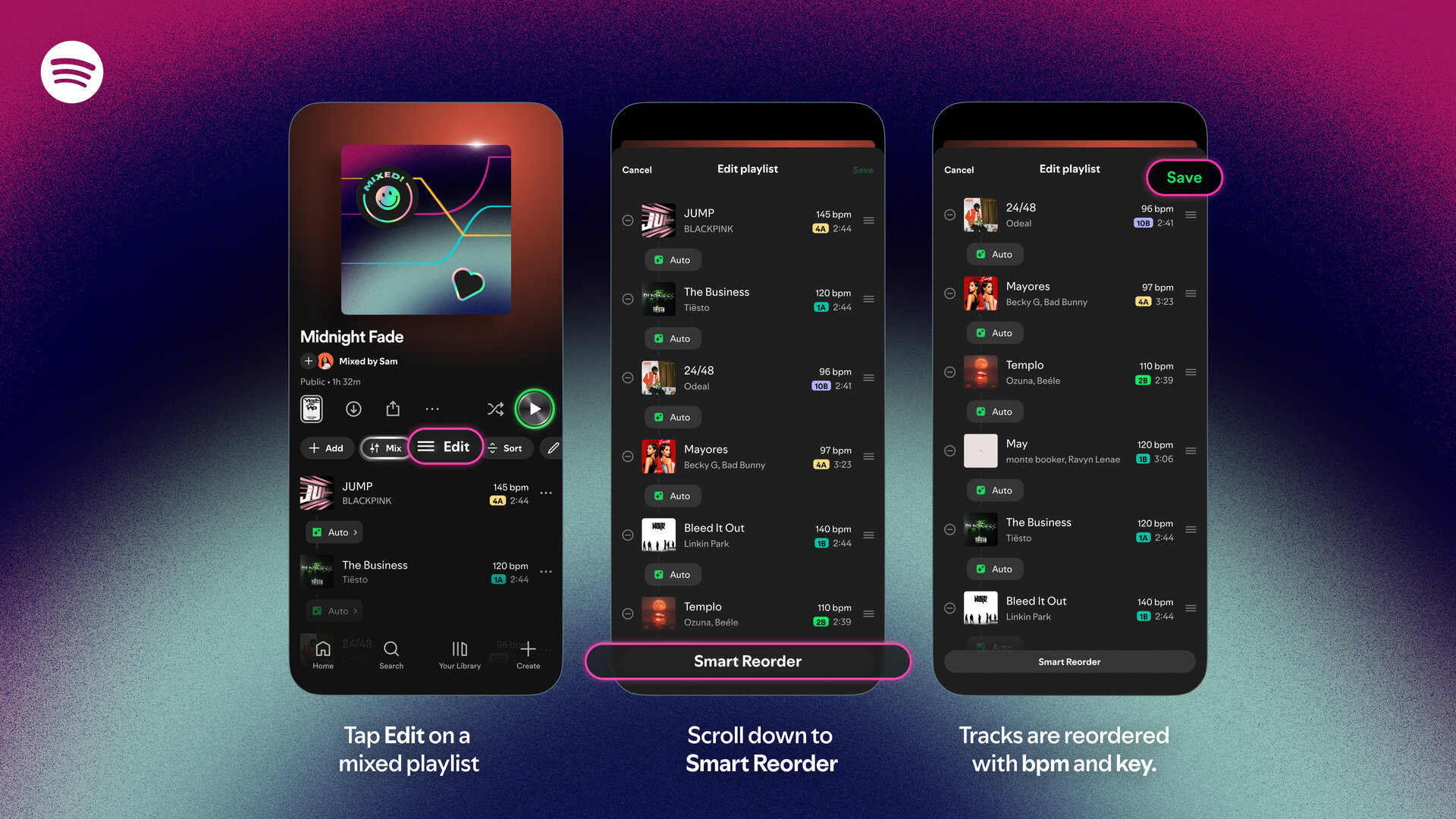
Using Smart Reorder is as simple as it sounds.
- Open one of your playlists in the Spotify app
- Tap Mix at the top of the playlist
- Tap Edit to find Smart Reorder
- Apply it, and your tracks will automatically be rearranged based on BPM and key
It really couldn’ be simpler!
Need some mixing inspiration?
Spotify is also highlighting its Mixed By hub for inspiration. The hub now features playlists from artists including John Summit, Becky G, Normani, Beéle, Mike Shinoda + Joe Hahn of Linkin Park, Odeal, GroovyRoom, and monte booker.
As part of the feature announcement, Spotify also revealed some of the most popular track transitions globally (data spanning August 2025 to January 2026). These include:
- “Wake Me Up” (The Weeknd) into “After Hours” (The Weeknd)
- “Low” (Flo Rida) into “S&M” (Rihanna)
- “No Lie” (Sean Paul) into “Adventure of a Lifetime” (Coldplay)
- “Safaera” (Bad Bunny, Jowell & Randy, Ñengo Flow) into “EoO” (Bad Bunny)
- “Femme Fatale” (Mon Laferte) into “Perdón” (Camila)
- “Homecoming” (Lil Uzi Vert) into “20 Min” by (Lil Uzi Vert)
- “Dos Mil 16” (Bad Bunny) into “Vuelve” by (Daddy Yankee & Bad Bunny)
- “euphoria” (Kendrick Lamar) into “TOXIC (with Skepta & Playboi Carti)
These combinations show how powerful sequencing can be. A well-timed transition can change the entire feel of a playlist.