
What is YouTube Studio? The complete guide for artists
Learn how to use YouTube Studio to grow your channel, connect with fans, and monetise your channel.
If you’re an artist or creator uploading to YouTube, chances are you’ve heard of YouTube Studio. But what exactly is it, and how can it help you grow your channel, connect with fans, and make the most out of your content?
We hope this all-in-one guide can help you understand and make the most of YouTube Studio.
Click below to jump to one of the following:
What is YouTube Studio?
Think of YouTube Studio as the hub for everything to do with your channel. It’s where you can manage your uploads, check your analytics, interact with fans, and customize your channel. Whether you’re just starting out or already have an established channel, learning your way around YouTube Studio will give you the tools you need to level up your YouTube following.
Channel Dashboard
The Dashboard is the first thing you’ll see when you open YouTube Studio. It gives you a quick snapshot of your channel’s recent activity. This is want it looks like:
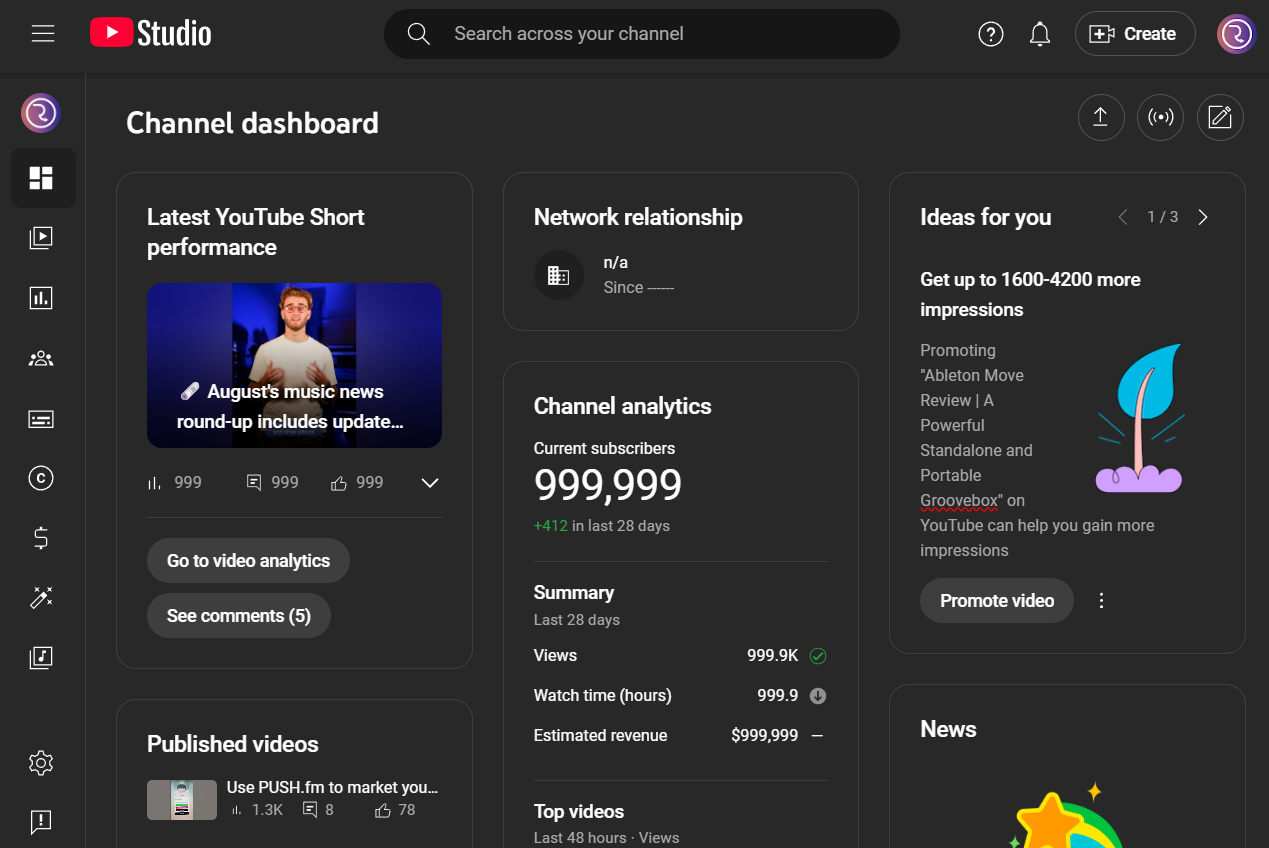
Here you’ll find:
- Recent performance updates for your latest videos, Shorts, and posts
- An overview of analytics
- Recent subscribers
- Comments waiting for your reply
- News, updates, and ideas from YouTube
It’s a great place to get a quick overview of what’s happening on your channel without diving too deep.
Content Tab
The Content tab is where all your uploads live. It covers everything from videos to Shorts, livestreams, podcasts, playlist, or even promotions.
From here you can:
- Edit titles, descriptions, and tags
- Schedule uploads or go live
- Test thumbnails with the Test & Compare feature
- Explore the Inspiration tab to spark new content ideas
If you’re in the YouTube Partner Program, you can Test & Compare different thumbnails and titles. This helps creators see which combination performs best. But, it’s something that Ebi Atawodi (Product Management Lead for YouTube Studio) recently said is only there to help prevent you overthinking small differences and lets you understand what your audience responds to.
Basically, this lets you manage and edit your content all in one place. Optimising this tab ensures your content stays searchable and engaging for viewers.
Analytics
Analytics is where things get useful, helping creators to understand their audience. Instead of just looking at views, YouTube Studio dives deeper. It focuses on in-depth stats surrounding your content, audience, revenue, and trends, which gives you a clearer picture of how your videos are connecting with your fans.
For example, you can jump into:
- How different content (Shorts, videos, live) is performing
- Which videos are bringing in new fans versus keeping your regulars coming back
- Insights into click-through rates, average view duration, and watch time from impressions
- Where your viewers are watching from, what devices they’re using, and even when they’re most active
- Revenue stats, including how much you’re making from ads on videos compared to Shorts
- Content people are searching for to help inspire your next video
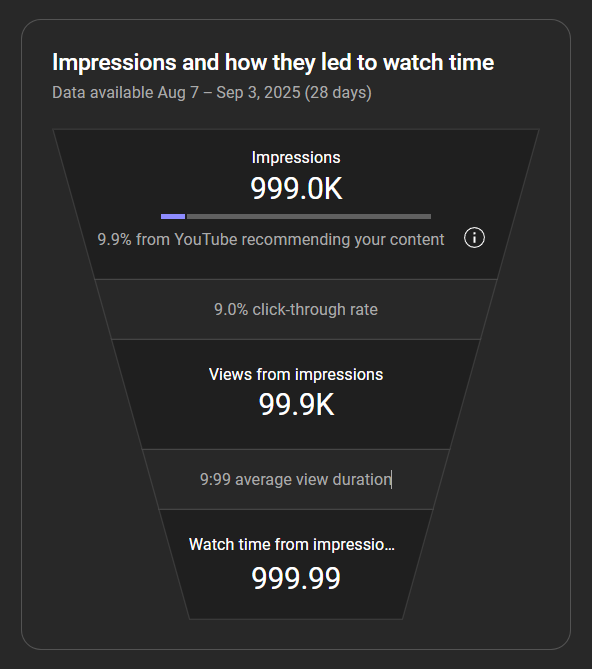
A lot of people care about their “1 out of 10” ranking. This is used to see how your latest video is performing compared to your last 10 videos. But, here’s a pro tip: Don’t panic if a video ranks “10 out of 10” (the worst of the last 10). That doesn’t mean it failed. A video about a niche topic may rank lower overall, but still be incredibly successful with that target audience.
Community
Engagement is huge on YouTube, and the Community tab helps you stay on top of it. This is where you’ll find all your comments, so you can reply to fans, pin your favourites, or manage any spam.
Proactive engagement here can help turn casual viewers into long-term subscribers and lifelong superfans.
Channel Customisation
Your channel is where your content lives, and the Customisation tab lets you design it exactly how you want. Here you can:
- Change your profile picture, banner, channel name and handle
- Update your channel description with relevant links
- Create a channel trailer which welcomes new and returning viewers when they first click on your channel
- Organise the layout of your channel into 10 Channel Sections, making it neat and easy to navigate
Think of it as your storefront. It’s the first thing that people see when checking out your channel, so be sure to make it welcoming, memorable, and optimized for search.
Earn with YouTube
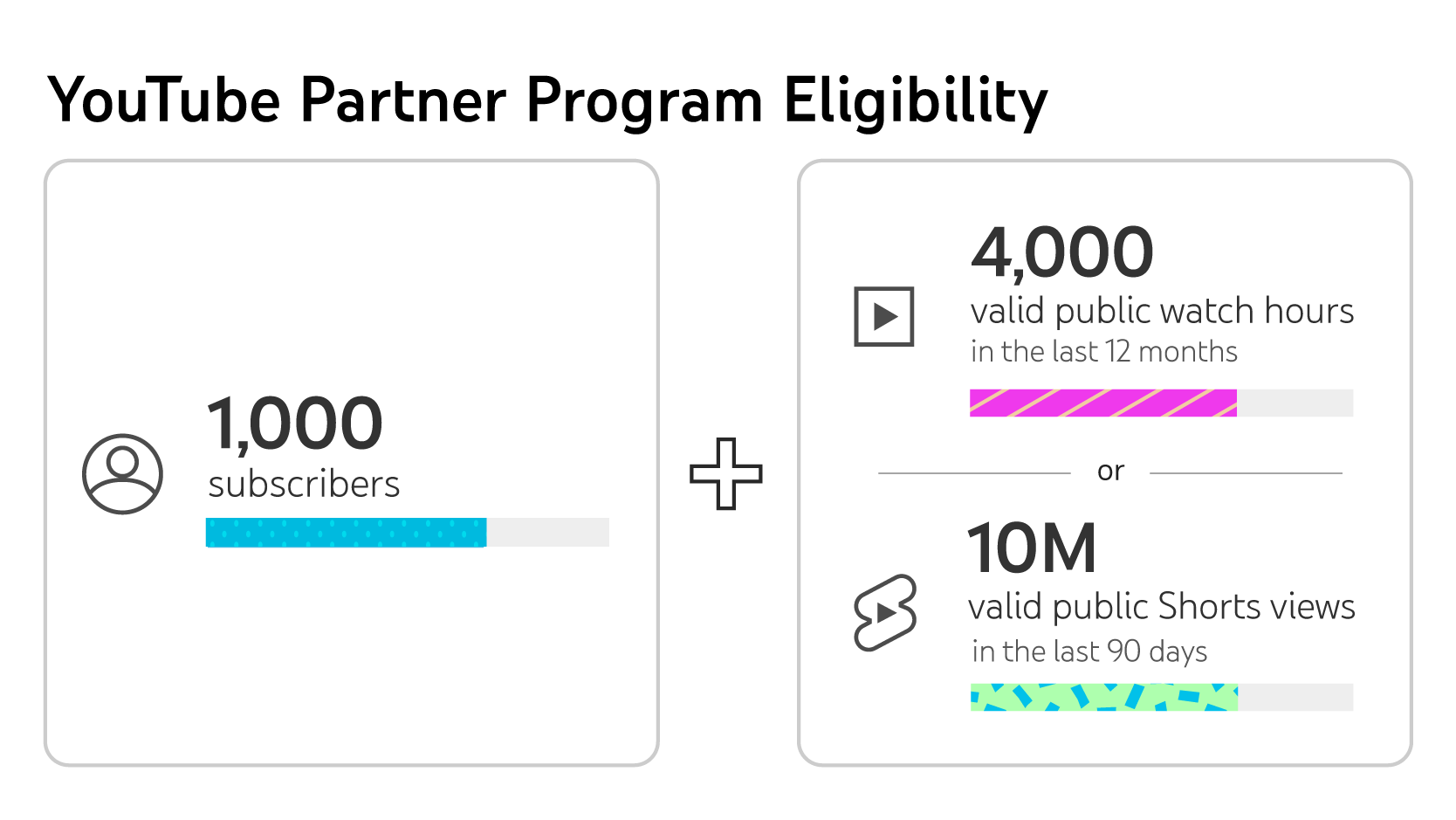
The Earn tab is where you’ll track and manage your earnings. The best way to start earning on YouTube is being part of the YouTube Partner Program. This lets you start earning from ads displayed on your videos, but you’ll need to meet the eligibility criteria:
YouTube also offers many ways to monetise your content and start earning. Beyond ads, you can also look into:
- Super Thanks, Super Chat, and Super Stickers
- YouTube Shopping
- BrandConnect opportunities
This is where your YouTube presence starts turning into real revenue streams, helping you monetise your channel effectively. For an artist, expanding your revenue beyond just your music royalties is crucial, and YouTube can make that happen.
Other Handy Tools
Within YouTube Studio, you can also find more useful tabs:
- Languages Tab: Manage translations so your videos can reach global audiences.
- Copyright Tab: Keep track of copyright claims on your videos.
- Audio Library: The audio library offers a treasure chest of free sounds and music you can use in your videos.
The Future of YouTube Studio
YouTube is constantly evolving Studio to act as a true creative partner for any creator. Expect more personalised ads, AI-powered suggestions for titles or storyboards, and even smarter ways to connect with fans.
As YouTube Studio’s Product Management Lead Ebi Atawodi puts it, the goal is to “reduce the weight of the publish button”. In other words, to make sharing your videos with the world as easy and rewarding as possible.
A Creative Partner
For artists, YouTube Studio is more than just a back-end tool, it’s your partner in creativity. From managing your content and connecting with fans to tracking growth and monetising your work, it’s everything you need in one place.
So next time you upload, don’t just hit the publish button and leave. Dive into YouTube Studio, explore the tabs, and use the insights to shape your content strategy. The more you understand it, the more powerful it becomes for your music career.
Discover More
Still want to learn more about the YouTube Studio? YouTube recently sat down with their Creator Liaison Rene Ritchier, and Product Management Lead for YouTube Studio Ebi Atawodi to “pull back the curtain”. You can watch the full video below.