
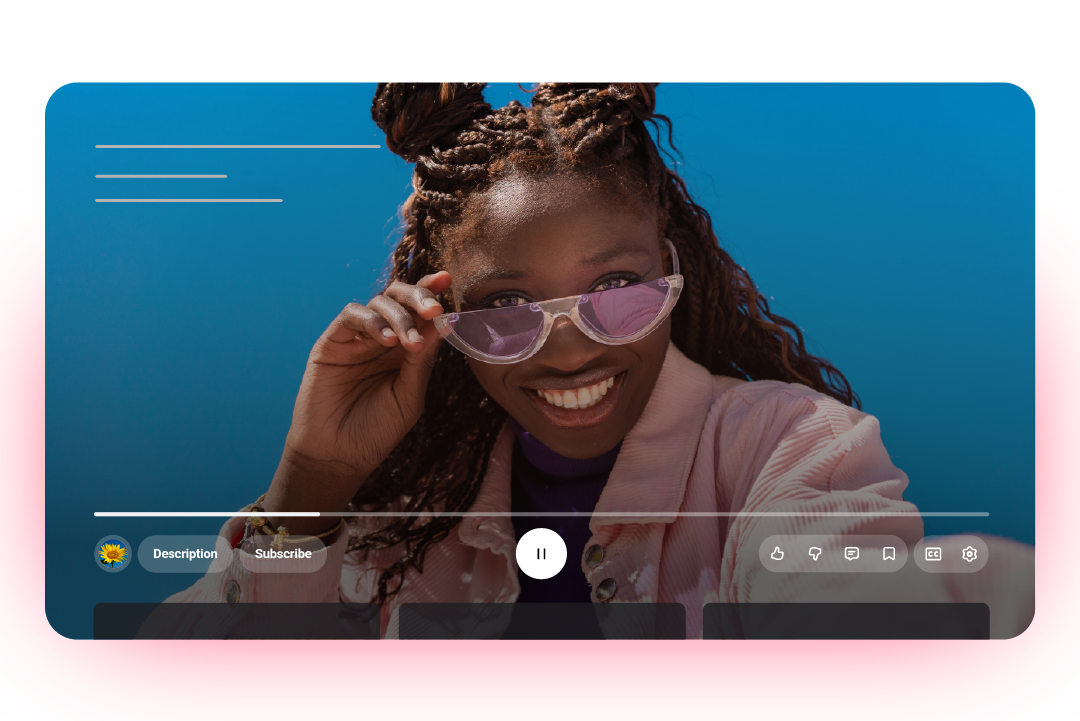
YouTube rolls out sleek new design for a more immersive viewing experience
A visual refresh brings a cleaner look and smoother interactions on YouTube across mobile, web, and TV.
YouTube is refreshing its design to make watching videos feel smoother, cleaner, and more immersive. The update revamps the video player’s layout across devices and introduces fun new ways to interact with content.
The move aligns with YouTube’s recent push to make the platform feel more engaging and less interrupted. Just last month, YouTube made it easier to hide distracting end screen pop-ups.
A more immersive visual experience
The new look is all about letting the content truly take center stage. YouTube has shifted key video details and buttons around so that nothing gets in the way of what you’re watching.
On TV
YouTube on TV now gives viewers a less cluttered screen when watching a video. Video titles have been moved to the top-left corner, while all other controls are now tucked out of the way beneath the progress bar. The channel icon, Description, and Subscribe button now sit neatly in the bottom-left corner, while Like, Dislike, Comments, Save, Captions, and Settings are grouped in two pills in the bottom-right. The play/pause button sits nicely at the center of this bottom section.
The result? A cleaner, distraction free-view.

On mobile
Mobile devices receive a similar treatment, but the changes are more subtle. The double-tap to skip feature (Seek) is now smoother and less intrusive, while transitions between tabs feel more fluid thanks to what YouTube calls “improved motion design”.

New ways to interact
YouTube isn’t just polishing the look, it’s adding some new features too.
Across specific content, the like button now comes with dynamic animations that reflect the content you’re engaging with. For instance, hitting Like on a music video will trigger a musical note animation, while sports content could show visual cues inspired by the game.
YouTube has also made it easier to save videos to Watch Later or a playlist, making it sleeker and more visual in process.
As for the comments section, new threading makes following conversations smoother and more structured, helping viewers follow and keep track of the most relevant replies.

Closing remark
While these tweaks are nothing groundbreaking, they highlight YouTube’s ongoing effort to refine the user experience for its billions of users, and the countless creators behind the content.
The updates started rolling out globally the week beginning October 13th.