Apple HomeView vs iPad: Which Is Better for Listening to Music at Home?
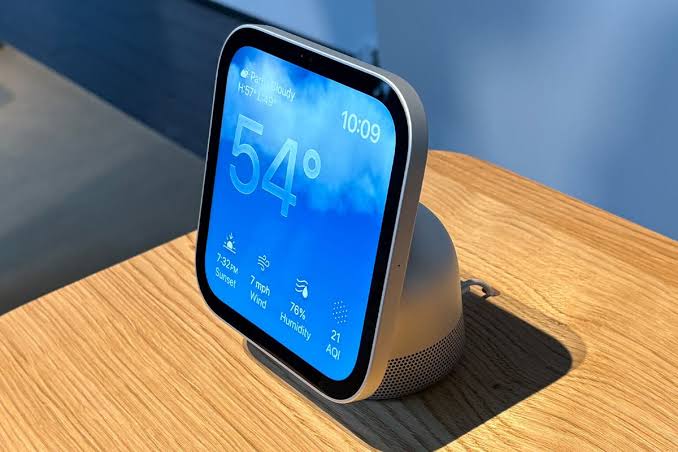
Apple’s new HomeView looks rather like a small iPad designed to live permanently on a kitchen counter. Both products have touchscreens. Both can display music and artwork. Both can help you find something to listen to.
So why buy a £299 HomeView when you could already use an iPad, or perhaps pick up a tablet that does far more?
The answer comes down to what you want your music device to do. An iPad offers broader music apps, portability and far more general-purpose features. HomeView is built for a shared, always-available spot in your home, with dedicated speakers, a smart-home interface and an Apple Music experience that doesn’t require you to prop up a tablet.
What can an iPad do that HomeView can’t?
An iPad is a full tablet with access to Apple’s App Store. You can install Apple Music, Spotify, YouTube Music, Amazon Music and many other supported apps. You can browse complete libraries, use headphones, download supported content for offline listening and switch freely between music, video, games and work.
HomeView takes a narrower approach. It has its own built-in Music app, along with other home-focused apps. Apple also says it supports compatible third-party audio and video apps from an iPhone, but that isn’t the same as a conventional App Store offering unrestricted downloads directly to the screen.
If you change music subscriptions regularly or like exploring niche audio apps, an iPad is the more flexible option. It also offers a known, established experience today, whereas HomeView’s third-party app behaviour still needs testing after its November launch.
Why might HomeView be better for music around the house?
HomeView is designed to stay in one place and be ready whenever someone walks past. The tabletop device has an adjustable seven-inch display, built-in speakers, a power connection and software that changes the information shown depending on how close you are.
That can matter more than you might expect. An iPad left on a counter may have a flat battery, be in another room or have been taken to school or work. A permanent HomeView could become the household’s regular place for playing music, checking the weather, seeing lyrics and controlling lights.
Apple also lets HomeView recognise up to six people for personalised experiences, subject to account and device requirements. An ordinary iPad is primarily set up around one user’s account and isn’t designed to switch its whole interface automatically whenever a different household member walks past.
If your family shares music throughout the day, that dedicated design is HomeView’s strongest selling point.
Which has better sound quality?
The tabletop HomeView has a specific advantage on paper: it was engineered to be a home speaker as well as a display. Apple lists two full-range drivers, a down-firing woofer and two force-cancelling passive radiators, with computational audio adjusting sound in real time.
An iPad’s speakers are designed within a thin portable tablet. They can be excellent for watching videos and casual listening, but their physical constraints differ from a device with a purpose-built speaker base.
That doesn’t prove HomeView sounds better than every iPad. Different models have different speaker systems, and HomeView isn’t yet available for a fair head-to-head comparison. But the tabletop HomeView has a reasonable basis for being more satisfying as a fixed kitchen music player.
The wall-mounted HomeView is a different story: it has only two full-range drivers, without the tabletop version’s listed woofer and passive radiators. Don’t assume both HomeView models have equal bass.
Which is better for song lyrics and album artwork?
Both can display lyrics and album artwork with supported Apple Music content. HomeView places these features at the centre of its design, and Apple has confirmed animated artwork and lyrics on its built-in Music interface.
An iPad provides a larger screen on many models and gives you more control over how you browse songs, albums and music videos. You can also use third-party lyrics and discovery tools where they are available.
HomeView has the advantage of being permanently positioned where everyone can see it. If you enjoy following lyrics while cooking or hearing a new song and glancing at its artwork, a shared display could feel more natural than retrieving your personal tablet.
For a proper sit-down session spent researching artists or exploring a large library, the iPad’s flexibility wins.
Can you use the same headphones and speakers?
An iPad already supports Bluetooth headphones and other standard Apple audio options, and it can send music to compatible AirPlay devices.
HomeView supports AirPlay multiroom audio, including compatible speakers around the home. Apple also lists Bluetooth 6.0 in the wireless specifications, but it has not specifically confirmed conventional Bluetooth headphone and speaker pairing for audio output. Bluetooth connectivity in the specifications is not sufficient proof of that feature.
If private listening through headphones is essential, the iPad is the safer choice. HomeView is designed around listening in a shared space.
Which one is better for smart-home controls?
HomeView’s main purpose is to provide a persistent household dashboard. It works within Apple’s Home ecosystem and offers a screen that’s easy for different household members to approach.
An iPad can also run the Home app and control compatible accessories. But an iPad usually doesn’t remain plugged in and visible in a central place all day. HomeView is also designed for the newer Siri AI experience and personalised shared interactions.
If music is only one part of your plan, alongside lights, cameras, timers and calendars, HomeView begins to make more sense.
What about the price?
HomeView starts at £299. Apple’s standard iPad has been listed from £429 in the UK, while other iPad models cost considerably more. But price alone isn’t the whole comparison.
If you already own an iPad, your extra spending could be zero. A stand and a suitable wireless speaker might be enough to create a very capable kitchen music setup. If you need to buy a new tablet, HomeView starts at a lower price than a new standard iPad but offers a smaller range of uses.
Think about whether you’re buying a household appliance or a personal screen. HomeView is closer to the first; the iPad is firmly the second.
Which should you choose?
Choose an iPad if you want portable music, a wide choice of streaming apps, Bluetooth headphones, video, games and general-purpose tablet features. If you already own one, try using it in your preferred room before spending more.
Choose the tabletop HomeView if you mainly use Apple Music, want a permanent shared screen, value hands-free home controls and expect to listen through its built-in speakers regularly.
For many households the answer isn’t that one replaces the other. An iPad remains your flexible personal device, while HomeView could become a convenient shared place for music at home. Whether that convenience is worth £299 is the real question.