Yoto Player 4th Gen – Everything You Need to Know About the New Yoto Device
Yoto has revealed its next generation of screen-free audio players for children, introducing the new Yoto Player 4th Gen alongside the Yoto Mini 4th Gen.
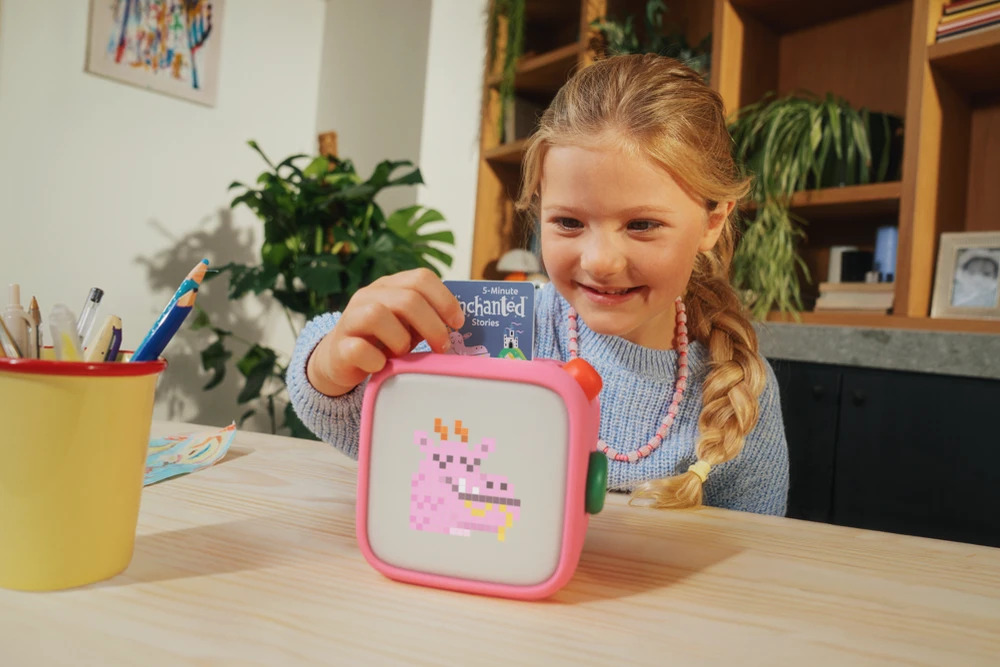
The new Yoto Player keeps the basic idea that made Yoto popular — children can insert physical Yoto Cards to listen to stories, music and other audio without needing a phone or tablet — but introduces one of the biggest changes to the platform so far: a new Green Button that lets children browse and play selected content without using a card.
Yoto says the fourth-generation devices have also received a substantial internal hardware upgrade, making them faster and more responsive while improving Wi-Fi and Bluetooth connectivity.
What is the Yoto Player 4th Gen?
The Yoto Player 4th Gen is the latest version of Yoto’s larger home audio player for children.
Rather than giving children access to a traditional touchscreen, apps or the open internet, Yoto is built around physical cards. Insert a card and its associated audiobook, story, music or other content starts playing.
The fourth-generation model continues to support Yoto Cards, but Yoto is beginning to move beyond requiring a physical card for every listening session.
Its biggest new feature is the Green Button.
What does the new Yoto Green Button do?
The Green Button gives children direct access to favourite audio stored on the Yoto Player.
Parents can create separate daytime and nighttime selections through the Yoto App, with each playlist supporting up to 20 titles. Children can then twist the Green Button to browse their available content and press it to start listening.
That means a child who wants to listen to the same audiobook every night doesn’t necessarily need to find the corresponding Yoto Card first.
Parents can add stories, music, podcasts, radio, soundscapes, sleep sounds, timers and even their own recordings to these selections. Compatible content can also be downloaded to the device so it remains available without an internet connection.
It is a fairly significant change to how Yoto works.
Physical cards remain central to the platform, but the Green Button effectively gives children a small personalised audio library directly on the device.
Yoto Player 4th Gen gets Day and Night Modes
The Green Button works alongside new Day and Night Modes.
Parents can set different content and volume limits depending on the time of day.
A daytime selection might contain Yoto Daily, music and children’s podcasts, while the nighttime selection could switch over to audiobooks, calming sounds and sleep content.
Yoto Daily and Yoto Radio are included in the daytime Green Button playlist by default, while Yoto Sleep Radio is available for nighttime listening.
This could make the new Yoto particularly useful as a bedside device rather than simply an audiobook player.
A new full-panel night light
Yoto has also redesigned the night-light experience.
The Yoto Player 4th Gen includes a full-panel LED night light rather than simply treating the feature as a small additional light.
It can work alongside the player’s clock and “okay-to-wake” settings, giving parents the ability to use the device as part of a child’s bedtime and morning routine.
Stories, sleep sounds, alarms, timers, a night light and a clock can therefore all be handled by the same device.
Faster performance and better connectivity
Some of the biggest improvements are hidden inside the new Yoto.
Yoto says it has overhauled the technology powering both fourth-generation players. Audio should download faster, the interface should respond more quickly, and connections to the Yoto App, headphones and other Bluetooth devices should be more reliable.
The full-size Yoto Player 4th Gen includes Wi-Fi 6 with dual-band connectivity and Bluetooth LE 6.1.
This might not sound as exciting as the Green Button, but it could ultimately be one of the more noticeable improvements for families that use Yoto every day.
Yoto Player 4th Gen storage increases to 64GB
Yoto has also significantly increased the amount of local storage.
The Yoto Player 4th Gen includes 64GB of storage, which the company says is enough for more than 1,000 hours of audio.
More storage becomes particularly useful now that the device isn’t entirely dependent on cards.
Families can keep more content downloaded locally, allowing children to listen when Wi-Fi isn’t available.
Yoto Player 4th Gen sound quality
The new Yoto Player features an acoustically engineered 5W stereo speaker system.
Yoto is positioning the larger Player as its home-focused device, with stereo sound designed for music, stories and bedtime audio.
There is also support for wired headphones through a 3.5mm headphone connection as well as Bluetooth headphones.
Yoto Player 4th Gen battery life
The Yoto Player 4th Gen offers up to 14 hours of battery life.
Charging is handled through USB-C.
Interestingly, the outgoing third-generation Yoto Player advertised up to 16 hours of playback, so battery endurance is one area where the headline specification has actually dropped slightly.
For a device primarily designed to live around the home, however, the difference may not be particularly important for most families.
Yoto Player 4th Gen specifications
The main Yoto Player 4th Gen specifications include:
- 11.5 × 11.5 × 11cm dimensions
- Approximately 763g weight
- 5W acoustically engineered stereo speaker
- 64GB storage
- More than 1,000 hours of audio storage
- Wi-Fi 6 dual-band connectivity
- Bluetooth LE 6.1
- USB-C charging
- Up to 14 hours battery life
- Bluetooth and 3.5mm wired headphone support
- Full-panel LED night light
- Okay-to-wake clock and cues
- Parental controls through the Yoto App
- Yoto Card and Green Button playlist support
Do old Yoto Cards work with Yoto Player 4th Gen?
Almost all existing Yoto Cards will continue to work with the new fourth-generation Player.
However, there is currently one important exception.
Yoto says interactive card functionality isn’t yet available because the fourth-generation players are running on an entirely new technology platform. The company says compatibility is coming and describes the limitation as temporary.
That is worth knowing if your family already owns interactive Yoto content.
Is the Yoto Player still screen-free?
Mostly.
Yoto continues to describe its products as screen-free audio players, but the display now has a slightly more important role.
When children turn the Green Button, title artwork appears on the display to help them choose what to listen to. During playback, the display can show Yoto’s familiar icons for chapters and tracks, while at other times it functions as a clock.
It is still very different from handing a child an iPad or smartphone. There are no conventional apps, social feeds or video streaming services competing for their attention.
The display is there primarily to help children navigate an audio experience.
How much does the Yoto Player 4th Gen cost?
Yoto’s US store lists the Yoto Player 4th Gen at $149.99, with pre-orders available and estimated dispatch beginning October 15, 2026.
Regional pricing and availability may differ.
The Yoto Mini 4th Gen is also launching, with Yoto positioning that model as the more portable option. The Mini adds IP67 water and dust resistance, while the larger Player focuses more heavily on stereo sound, bedtime routines and its full-panel night light.
Is the Yoto Player 4th Gen worth upgrading to?
For someone buying their first Yoto, the fourth-generation model is now clearly the one to consider.
The Green Button solves one of the more obvious limitations of the original Yoto concept. Cards are great for giving children something physical to interact with, but having to locate the right card every single time isn’t always convenient.
Now families can have both.
Kids can continue building a physical Yoto Card collection while keeping their favourite stories, music and bedtime audio immediately available from the Player.
For existing Yoto Player 3rd Gen owners, the decision is less obvious. The third-generation Player already does the core Yoto job extremely well, and Yoto even notes that previous Players have some quick-access functionality through the existing right-hand button.
The upgrade will make more sense for families that particularly want the Green Button interface, additional storage, new night-light system and faster internal hardware.
Yoto 4th Gen pushes screen-free audio forward
Yoto isn’t dramatically reinventing its product with the fourth generation.
Instead, it appears to be removing friction from the idea.
Physical Yoto Cards are still there when kids want them. But favourite music and stories can now live directly on the Player. Parents get greater control over daytime and bedtime listening, while the faster hardware and significantly larger storage should give Yoto more room to expand the platform in the future.
And that last point could prove important.
Yoto says the completely new technology platform inside its fourth-generation devices gives the company more scope to introduce additional features and improvements over time.
For families looking for an alternative to giving young children their own tablets or phones, the Yoto Player 4th Gen is shaping up to be one of the more interesting screen-free audio devices available.