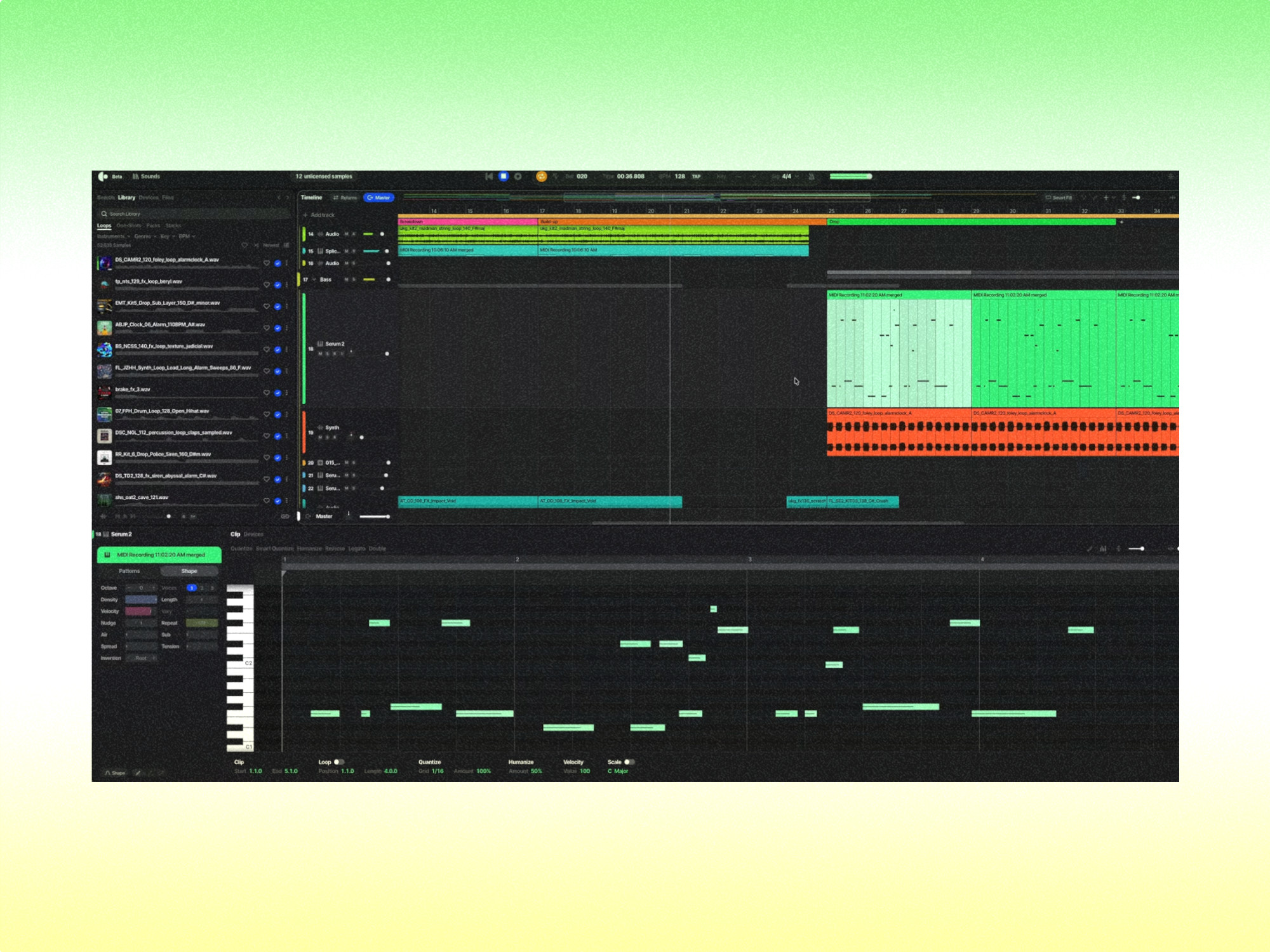
Splice launches Create: a new AI-powered DAW with millions of samples built in
Splice has officially entered the digital audio workstation (DAW) market with the launch of Splice Create, a new music production platform that combines millions of royalty-free samples, virtual instruments and AI-powered production tools in one application.
Announced on 5 November 2026, the new software marks a significant expansion for Splice, which has become one of the music industry’s most recognisable platforms for discovering and licensing samples.
Rather than simply providing sounds for producers to use in existing software, Splice now wants to become the place where artists create their music from start to finish.
The new DAW also introduces Rheo, an AI assistant capable of understanding voice and text commands to help producers build, arrange and edit their tracks.
What is Splice Create?
Splice Create is a standalone digital audio workstation designed to make music production more accessible for beginners while offering useful workflow tools for experienced producers.
A DAW is the software used to record, arrange, edit and mix music. Popular examples include Ableton Live, FL Studio, Logic Pro and Pro Tools.
While Splice has traditionally provided samples, plugins and production tools that work alongside these applications, Create brings much of that functionality into its own music-making environment.
The software includes a multitrack timeline, mixing tools, virtual instruments, audio effects, MIDI editing and support for third-party plugins.
Its biggest advantage is the direct integration of Splice’s catalogue of more than three million human-made, fully licensed sounds.
This means producers can search for samples, experiment with arrangements and develop complete tracks without constantly switching between applications.
Splice Create’s biggest features
1. More than three million royalty-free samples built in
One of the most attractive features of Splice Create is its integration with the company’s extensive sample library.
Producers can browse millions of loops, one-shots, instrumental recordings and other sounds directly inside the DAW.
The software can also help find samples that match the tempo, key and musical context of an existing project.
For example, a producer working on a house track could search for a particular bassline, drum loop or vocal sample and audition it alongside the music they have already created.
Samples can be previewed within a project before being licensed, allowing musicians to experiment with different ideas without immediately committing to individual sounds.
This could make sample-based production significantly faster, particularly for artists who regularly use Splice alongside another DAW.
2. Rheo: an AI assistant that works inside your DAW
Perhaps the most interesting addition is Rheo, Splice Create’s built-in AI production assistant.
Unlike a conventional chatbot that simply answers questions, Rheo can interact directly with the music production software.
Producers can communicate using natural language, either by typing instructions or speaking.
For example, users can ask Rheo to:
- Find a drum sample that fits an existing beat.
- Add reverb or compression to a particular instrument.
- Adjust the volume of a bassline.
- Create a MIDI chord progression.
- Organise tracks into groups.
- Suggest improvements to an arrangement.
The assistant can carry out actions within the project rather than requiring the producer to navigate every menu manually.
This represents an interesting development for AI music tools. Instead of simply generating finished music, AI is being integrated into the production process itself.
For experienced producers, it could reduce the time spent on repetitive technical tasks. For beginners, it could make complicated production software considerably easier to understand.
3. Point Mode helps beginners learn music production
Splice Create also introduces an educational feature called Point Mode.
Rather than automatically completing a task, Rheo can guide the user through the process using an interactive pointer within the application.
For example, someone unfamiliar with compression could ask how to control the dynamics of their vocals.
Point Mode can show them which controls to use and explain the process step by step.
This makes Create particularly interesting for musicians who want to develop their production skills rather than rely entirely on automated tools.
It also offers a potentially more accessible route into music production for people who find traditional DAWs intimidating.
4. Built-in instruments, effects and third-party plugins
Splice Create is more than a sample arrangement tool.
The platform includes virtual instruments, synthesizers, drum production tools and audio effects, alongside access to Splice INSTRUMENT.
Users can also load compatible third-party plugins and work with their own sample collections.
That means producers are not restricted to the sounds and instruments available through Splice.
For musicians already using other production software, Create also supports exporting finished mixes and individual audio stems, provided they have a qualifying subscription.
Those stems can then be imported into another DAW for additional recording, editing or mixing.
5. AI-powered sound editing and music creation
Beyond Rheo’s conversational controls, Create introduces several intelligent audio production features.
These include stem separation, which can isolate elements such as vocals, drums and bass from a recording, and audio-to-MIDI conversion, which allows producers to turn musical recordings into editable MIDI notes.
Splice also offers sample Variations, allowing artists to explore alternative versions of existing sounds.
For producers working with loops, these tools could make it easier to experiment with different arrangements and transform existing material into something more personal.
Importantly, the resulting projects remain editable, allowing artists to maintain control over their creative decisions.
Is Splice Create free?
Splice Create is available to download for free, although there are important restrictions.
The free version allows users to access the DAW, create projects and experiment with its production tools without a time limit.
However, free users cannot export their finished projects or license Splice samples directly within Create.
Free accounts also receive 100 introductory Rheo units, which are consumed when interacting with the AI assistant.
To export finished music, users need a qualifying paid subscription.
How much does Splice Create Pro cost?
At launch, Splice Create Pro is available at an introductory price of $9.99 per month.
The subscription includes unlimited project exports, access to licensed Splice samples within Create without spending individual sample credits, and 1,000 Rheo units per month.
Additional Rheo units can be purchased when required.
Existing Splice Creator and Creator+ subscribers can also export projects from Create, although sample licensing and AI usage are handled differently under those plans.
Artists considering the software should therefore check Splice’s subscription options before committing.
Although the free version is useful for experimenting, anyone planning to release completed tracks will need to account for the cost of exporting them.
Does Splice Create use generative AI?
Yes, although its approach differs from AI music generators such as Suno and Udio.
Those platforms focus heavily on producing recorded music from text prompts, while Splice Create concentrates on assisting musicians inside a traditional music production workflow.
Rheo can help create MIDI patterns, arrange musical elements, suggest sounds and adjust a production.
However, the system primarily works with editable musical material and Splice’s existing catalogue rather than simply replacing the entire creative process with a generated recording.
Splice says its sample catalogue is human-made and that its AI training uses music it owns or has licensed.
The company also states that it does not train its AI models on music that users create or upload into Create.
This approach could appeal to musicians who are interested in using AI to improve their workflow but still want direct control over their compositions.
Can you release music made with Splice Create?
Yes. Splice says artists retain ownership of the original music they produce using Create.
The platform also supports royalty-free sample licensing, enabling musicians to incorporate licensed Splice sounds into commercial recordings.
However, producers need to ensure that every Splice sample used in a finished track has been correctly licensed.
Unlicensed sample previews are not included as usable audio when a project is exported. Splice also provides certified sample licences, which can be useful when distributing a track commercially.
There is an additional distinction between royalty-free and exclusive rights. Other producers can license the same Splice samples, so certain forms of automated copyright monetisation, including Content ID, may have additional eligibility restrictions.
Artists should keep their licensing documentation and check the requirements of their chosen distributor.
Once a completed song has been exported, musicians can use RouteNote’s free music distribution to release it to major streaming and download services without paying an upfront distribution fee.
Is Splice Create available on Windows?
At launch, Splice Create is available in beta for macOS 12 and later.
Splice has confirmed that Windows and web versions are planned, although it has not announced specific release dates.
Mac users can download the application through the official Splice website.
The beta status also means that the software and its features may continue to evolve as Splice gathers feedback from producers.
Can Splice Create compete with Ableton Live and FL Studio?
Splice Create enters an already competitive music production market.
Ableton Live, FL Studio, Logic Pro and other established DAWs have spent years developing sophisticated production environments and attracting loyal communities.
Convincing experienced producers to abandon their existing workflows could prove difficult.
However, Splice Create has an interesting advantage: it already sits within an ecosystem used by millions of music creators.
Rather than asking producers to adopt an entirely unfamiliar service, Splice can offer existing customers a more integrated way to work with sounds, instruments and production tools.
Its AI assistant also introduces a potentially meaningful difference in how musicians interact with software.
For beginners, being able to describe what they want to achieve and receive practical guidance could reduce the learning curve associated with music production.
For experienced producers, the ability to automate routine actions could become increasingly valuable.
Whether Create can match the flexibility and depth of established DAWs remains to be seen, particularly while the product is still in beta.
What does Splice Create mean for the future of music production?
The launch of Splice Create highlights an important shift in music technology.
For years, music production software has largely relied on musicians learning increasingly complex interfaces, tools and technical processes.
AI now offers the possibility of reversing some of that relationship.
Instead of requiring artists to learn exactly how every function works before they can produce music, software can increasingly interpret their intentions and help them achieve the desired result.
Splice Create is an example of that approach.
Its combination of a large licensed sample catalogue, traditional production tools and an interactive AI assistant could make music production more approachable without removing the musician from the process.
It also signals Splice’s ambition to become more than a sample marketplace.
By bringing sound discovery, production, learning and collaboration into one environment, the company is positioning itself as a broader platform for music creation.
For independent artists, the development is worth watching.
As music production tools become easier to use, the technical barriers to creating professional-sounding recordings may continue to fall.
Ultimately, the value of platforms such as Splice Create will depend not just on what their AI can do, but on how effectively they help musicians turn their own ideas into finished songs.
Splice Create is available to try now on Mac, with Windows and web versions expected in the future.