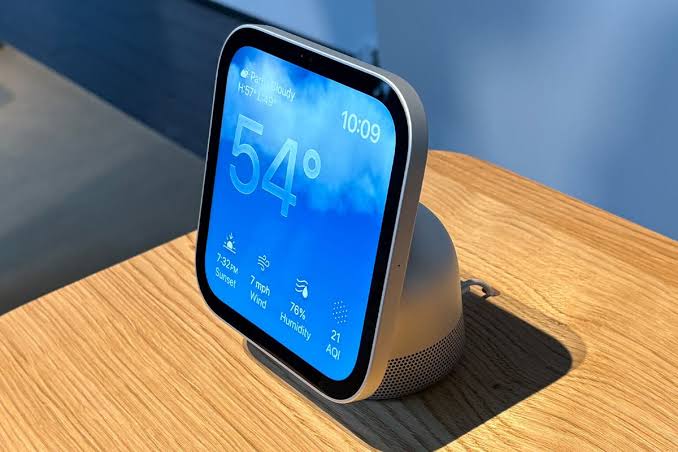
Can You Connect Bluetooth Headphones or Speakers to Apple HomeView?
Apple HomeView includes Bluetooth 6.0, according to Apple’s official technical specifications. That sounds like good news if you want to connect AirPods, wireless headphones or a Bluetooth speaker.
But there is an important difference between a product having Bluetooth hardware and supporting Bluetooth audio output. Apple has not specifically confirmed conventional Bluetooth headphone or speaker pairing for HomeView audio playback as of October 2026.
If private listening is a major reason you’re considering HomeView, this is one feature you should verify before buying.
Does Apple HomeView have Bluetooth?
Yes. Bluetooth 6.0 appears in the official HomeView wireless specifications, alongside Wi-Fi 6E and Thread networking technology.
Bluetooth can be used for a range of purposes, including device discovery, setup and communication with accessories. Its presence in a specification sheet does not confirm that a device supports every type of Bluetooth connection.
For example, a product can use Bluetooth to help with setup without functioning as a universal Bluetooth music transmitter. That distinction has mattered on other smart-home audio products, and it matters here too.
Apple has made AirPlay central to HomeView’s music story, but it has not yet documented a process for choosing Bluetooth headphones as its sound output.
Can you pair AirPods with HomeView?
AirPods are Bluetooth headphones, but they also have additional integration features within Apple’s ecosystem. It’s tempting to assume that HomeView will pair with them in the same way as an iPhone, iPad or Apple TV.
Apple hasn’t confirmed that specific feature. Its HomeView specifications don’t list an AirPods pairing procedure or promise that AirPods can be selected as an ordinary audio destination.
HomeView supports features such as FaceTime calling and music playback, but these don’t themselves establish that wireless headphones will work directly with it.
If you want to listen late at night without disturbing anyone, a known-compatible iPhone or iPad is currently the safer option for your AirPods.
Can you connect an ordinary Bluetooth speaker?
Again, not based solely on the Bluetooth 6.0 listing. There is no confirmed general-purpose Bluetooth audio-output feature that would guarantee compatibility with a portable Bluetooth speaker.
There is, however, a confirmed alternative for many home speakers: AirPlay. HomeView supports AirPlay multiroom audio, which Apple says can be used with compatible devices including HomePod, Apple TV 4K and other AirPlay speakers.
If your speaker supports AirPlay 2, that’s a more promising route than relying on an unannounced Bluetooth pairing feature. An ordinary Bluetooth-only speaker won’t automatically become an AirPlay speaker just because it can connect to your iPhone.
AirPlay vs Bluetooth: What’s the difference?
Bluetooth audio usually involves pairing a source device directly with headphones or a speaker over a short-range wireless connection. It is particularly handy for portable equipment and private listening.
AirPlay uses a network connection to send audio to supported devices, typically over Wi-Fi. It is built for home audio and can support multiroom playback across compatible speakers.
Both are wireless, but they are not interchangeable. A speaker with a Bluetooth logo might not support AirPlay, and an AirPlay smart speaker might not support standard Bluetooth audio in the way you expect.
For HomeView, Apple has specifically announced multiroom AirPlay. Its precise Bluetooth audio capabilities remain to be established.
What about Sonos speakers?
Certain Sonos speakers, such as the Era 100, support Apple AirPlay 2. That makes them interesting partners for HomeView in a networked home-audio setup.
The Era 100 also supports Bluetooth, but that is a separate feature. You should not need to rely on its Bluetooth mode if you’re using a supported AirPlay arrangement.
The exact controls HomeView offers for an AirPlay-compatible Sonos room will still need to be checked when HomeView launches. Apple has not announced a full Sonos controller app for the device.
What is the best way to listen privately?
Until direct Bluetooth headphone support is confirmed, the simplest approach is to play the music on an iPhone or iPad that you already know works with your headphones.
If you’re listening to Apple Music, Spotify or another supported service on your phone, you can enjoy the same songs privately without relying on HomeView. This won’t necessarily let you use HomeView’s screen as a complete remote for your headphone session; it’s simply the dependable option for private audio.
If private listening is essential to your setup, an iPad may be a better purchase than HomeView. An iPad already offers supported Bluetooth headphone pairing plus a much wider range of audio apps.
What should buyers check on launch day?
HomeView is due on 13 November 2026. Look for Apple’s own documentation or an independent test that confirms whether the device offers a Bluetooth audio-output menu, which headphones it supports and how audio switches between built-in speakers and personal listening devices.
It’s also worth checking for latency during video playback, microphone behaviour on FaceTime calls and whether multiple users can reconnect their own headphones conveniently. Those are practical details that a radio-version number doesn’t answer.
The bottom line
HomeView definitely has Bluetooth hardware, but that’s not the same as confirmed Bluetooth audio pairing. Apple has confirmed AirPlay for compatible home speakers, while headphones and ordinary Bluetooth speakers remain unanswered questions ahead of launch.
If you primarily want music throughout the house, focus on AirPlay compatibility. If you primarily want headphones, wait for an explicit confirmation before spending £299.