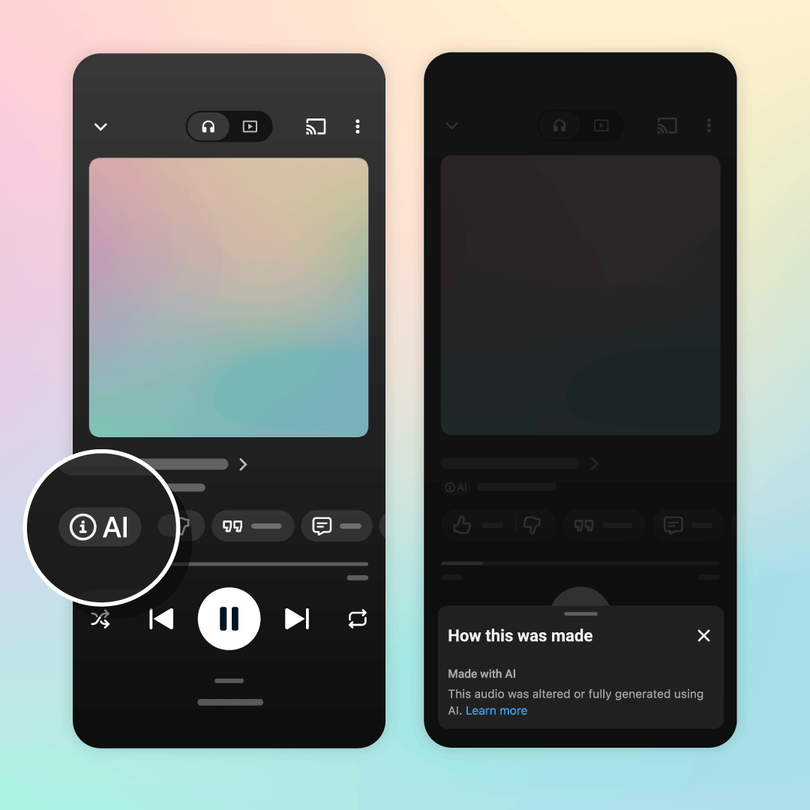
How to Fix an Incorrect AI Label on YouTube Music
YouTube Music is introducing labels to help listeners identify music created using generative artificial intelligence.
The system distinguishes between fully generated music, partly generated music and recordings where no generative AI was used.
But what happens if your music is labelled incorrectly?
The first step is understanding where the disclosure information came from.
How YouTube Music AI labels work
YouTube’s current guidance allows music partners to identify content as:
- Fully Gen AI
- Partly Gen AI
- No Gen AI
YouTube may also use other signals to assess content when declarations are missing or incomplete.
That means the label does not necessarily originate from something the artist personally entered into a YouTube interface.
Check whether the label is actually wrong
Before requesting a correction, review how the recording was created.
For example:
Using ordinary pitch correction or automated mastering does not necessarily make a recording generative-AI music under YouTube’s examples.
Generating an instrumental section with a music model may fall under partly generative AI.
Generating the full composition and vocals may fall under fully generative AI.
Use the platform’s actual definitions rather than relying on assumptions.
Identify which asset is affected
YouTube Music releases can involve different assets.
For example:
- sound recording;
- Art Track;
- music video;
- ordinary YouTube upload.
The appropriate correction route may depend on the asset and how it was delivered.
If your distributor delivered the recording
Contact the distributor with:
- release title;
- ISRC;
- UPC;
- YouTube Music link;
- screenshot of the label;
- explanation of the error.
Ask it to review the generative-AI metadata delivered to YouTube.
The distributor may need to submit a corrected declaration through its delivery system.
If you manage YouTube assets directly
YouTube’s official music-partner documentation describes disclosure updates through DDEX or CSV templates.
The current documentation includes values for fully generated, partly generated, non-generative and unknown status.
The exact correction process depends on the partner’s available access and delivery workflow.
Do not attempt to change unrelated metadata simply to remove a label.
What if YouTube applied the label automatically?
YouTube may use its own detection systems or other signals.
If the platform has applied a label despite the submitted declaration, the distributor may need to investigate further.
For ordinary YouTube Studio uploads, YouTube says creators can correct some automatically applied disclosures through the AI-use setting.
However, labels resulting from certain platform tools, Content Credentials or manual review may not be directly editable.
That distinction matters.
Gather useful production evidence
A correction request is stronger when you can explain how the recording was made.
Keep:
- session files;
- original vocal recordings;
- instrument recordings;
- production dates;
- stems;
- relevant software details;
- AI tool information if any.
The goal is not necessarily to prove that no software was involved.
It is to demonstrate whether generative AI contributed under the platform’s relevant definitions.
Don’t re-upload blindly
Removing a release and uploading it again may create unnecessary catalogue problems.
First ask whether the metadata can be corrected through the existing delivery.
Preserving the recording’s identity is usually preferable where possible.
Final thoughts
AI disclosure labels are becoming part of normal music metadata.
Mistakes may happen as systems develop.
If you believe a label is inaccurate, identify the affected asset, check the current definitions and work through the appropriate distributor or YouTube correction process.
Good production records make the explanation much easier.