Quantcast

Archive for: editor

M-Audio Venom Virtual Analog Synth & Editor

M-Audio has been developing Venom for the past few years they recently launched an affordable virtual analog synthesizer.

The Venom 49-key synthesizer combines the character of classic analog synths with modern digital processing to deliver an aggressive, infectious new sound. Even though you can dial up nice atmospheric pad with the Venom, the synth has a more Nord-like brittle edge to its sound, which Avid describes as “angry and downright nasty.” It’s hard to determine where this will sit in today’s music, but there will be quite a few budding and mature synthesists who will have no problem plunking down around $500 (street) for this new entry.

Features:
» 49-key, full-size, synth-action keyboard
» 12-voice polyphony, each voice including:
— 3 oscillators with 41 waveforms and 53 drum sounds sampled from vintage analog synths, FM digital synths, and drum machines
— pulse-width modulation, sync, FM, and ring modulation
— resonant multimode filter with tube saturation limiting
— 12 dB/octave (2-pole) low pass
— 12 dB/octave (2-pole) band pass
— 12 dB/octave (2-pole) high pass
— 24 dB/octave (4-pole) low pass
— 24 dB/octave (4-pole) band pass
— 24 dB/octave (4-pole) high pass
— 3 LFOs with selectable sample-and-hold
— 3 AHDSR envelopes
— 16 modulation routes
» 4-part multitimbral operation with independent MIDI-syncable phrase sequencers
» 512 onboard Single patches
» 256 onboard Multi (layered) patches
» 2 global bus effects: Reverb, Delay, Chorus, Flanger, Phaser
» 1 insert effect per multitimbral part (4 total): Compression, EQ, Distortion, Bit Reduction, Decimation
» classic arpeggiator with up, down, and alternating patterns
» tap-tempo and manual BPM control from top panel
» built-in USB 2.0 audio/MIDI interface (USB 1.1 backward compatible)
— 2 x 2 24-bit, 44.1 kHz operation
— mic, instrument, and stereo line level inputs route to DAW
— synth sounds route to DAW
— DAW audio output mixes into main outputs
— stereo main audio outputs (1/4″ TS)
— stereo headphone output (1/4″ TRS)
— master volume knob; instrument and mic gain knobs
— MIDI In and MIDI Out (5-pin DIN)
» large custom LCD
» 4 rotary encoders and 1 button for performance control and editing
» dual-function octave up/down and transpose controls
» assignable pitch bend and modulation wheels
» sustain (1/4″ TS) and expression (1/4″ TRS) pedal inputs

You can even use Venom as an audio interface with Pro Tools M-Powered (Requires Pro Tools M-Powered 8 or higher) and other music software—forming a powerful production machine to take your music in dangerous new directions.

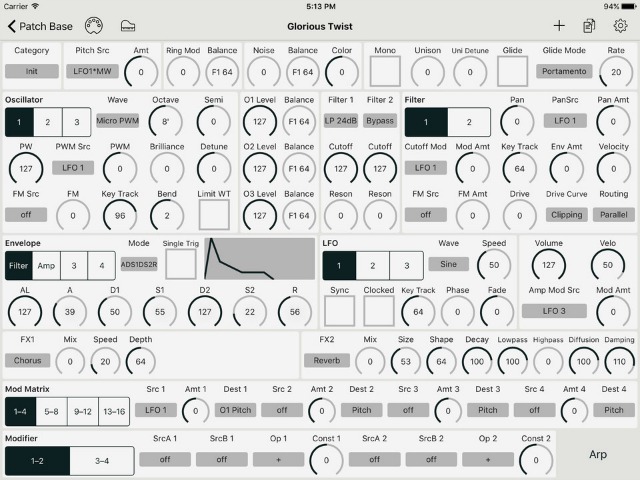
A nice compliment to the Venom is the included Vyzex Venom software editor. This is many users will really get creative with the synth and we have a feeling Avid will be upgrading Vyzex as Venoms fly off the shelves.

Vyzex Features:
» arrange sounds into banks, rename patches, and save backups
» patch collider feature mashes up multiple patches to create new hybrid sounds
» 16-cell modulation matrix offers comprehensive routing configurations

More information on M-Audio Venom.

Myna – Free Online Music Production Software

Myna - Online Sound EditorAs Apple are set to announce their iSlate, or whatever their tablet computer is going to be called, and we all contemplate the future of the ‘cloud’ of online applications and file storage that we’ll doubtless be accessing from our Dick Tracy watches and optical implants in a few short years, here is a neat little online music editing package that lets you save your projects online, and share them with other users. It’s by no means as sophisticated as desktop based programs like Cubase or Pro Tools, but as a means of roughing out a track with remote collaborators, Aviary’s ‘Myna’ is an excellent free web app.

As well as being able to upload your own tracks and samples to their server, you can import material from Soundcloud, pick and choose from their online libraries of loops and samples, and browse other people’s uploads for stuff to use in your project. You can then insert these clips into tracks just by dragging, and then use all the standard tools you’d expect from an audio editor; gain, fade, stereo balance, clip trim and loop, as well as a bank of simple effects like delay, reverb, filters and phasers. Once you’ve sketched out your track you can mix it down and export it as a .wav, or you can leave it up there to be edited by other users. It might not give you access to your favourite plugins, but this is a hell of a lot of music processing power for free.